

We asked an AI to design an app's screens. At a glance, the result looked pretty good. Then we measured it piece by piece: four screens, 13 different font sizes, and 13 different colors. Text was too faint to read comfortably in 24 places.
We gave the same job to the AI inside a working frame of rules and checks and refined it a few times. Font sizes settled into five steps, and not a single piece of unreadable text or hard-to-tap button was left.
We call this working frame a harness: the rule files, check scripts, role-specific agents, and commands that run automatically at set moments (hooks) that live in the folder where the AI works.
In this post we cover, in order:
- The experiment: once without a harness, once inside one
- Before and after in numbers, and the cost
- What the harness looks like: 8 stages and 3 human approvals
- Turning 8 design techniques into rules and checks
- Refining from version 1 to 4, with objective metrics
- When the checker was wrong
- Drawing in Figma for free: Talk to Figma
- Limits
How to read the numbers. [Measured] means we ran it and measured it ourselves. [Standard] means the criterion comes from the WCAG web accessibility standard. [Official docs] means guidance published by the maker (Apple, etc.). [Rule of thumb] means a target this harness set for itself, not a standard.
1. The experiment: the same request, twice
- Tools. Claude Code is an AI coding tool that reads files and runs commands in the terminal. Figma is a design tool for drawing app screens. Now that AI can draw directly in Figma, many people hand their first design drafts to AI.
- Task. A bike station status app for Ttareungyi, Seoul's public bike service. Data came from the Seoul Open Data Plaza's Seoul public bike real-time rental information (OA-15493).
- Conditions. Same spec, same model (Claude Opus), same prompt, down to "3–4 screens is fine." One run (A) started in an empty folder with only the spec and data; the other (B) started in the harness folder.
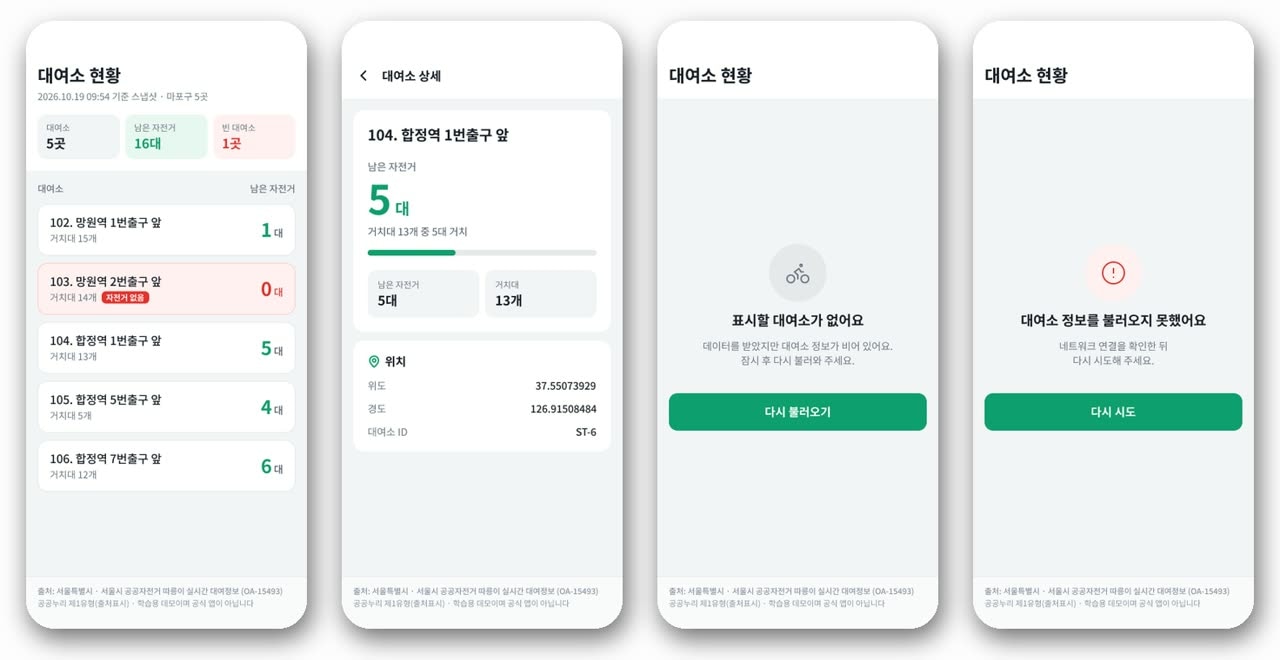
A produced four screens: list, detail, empty, and error. It has summary cards and plenty of color.
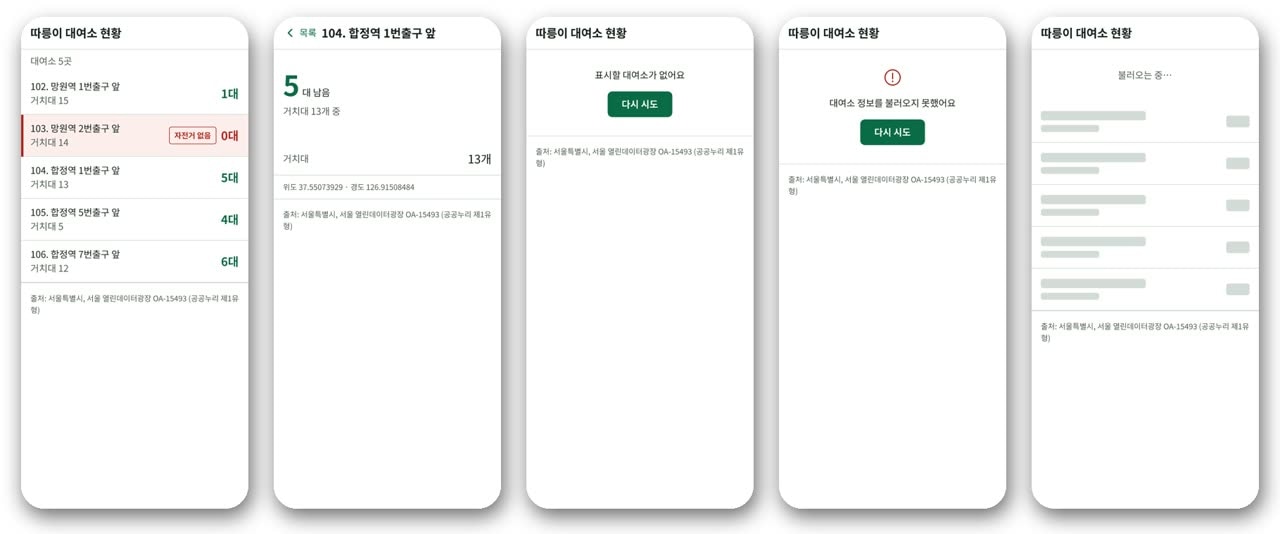
B produced five, including a loading screen, and is much tidier. It is also a bit plain.
2. Before and after in numbers, and the cost
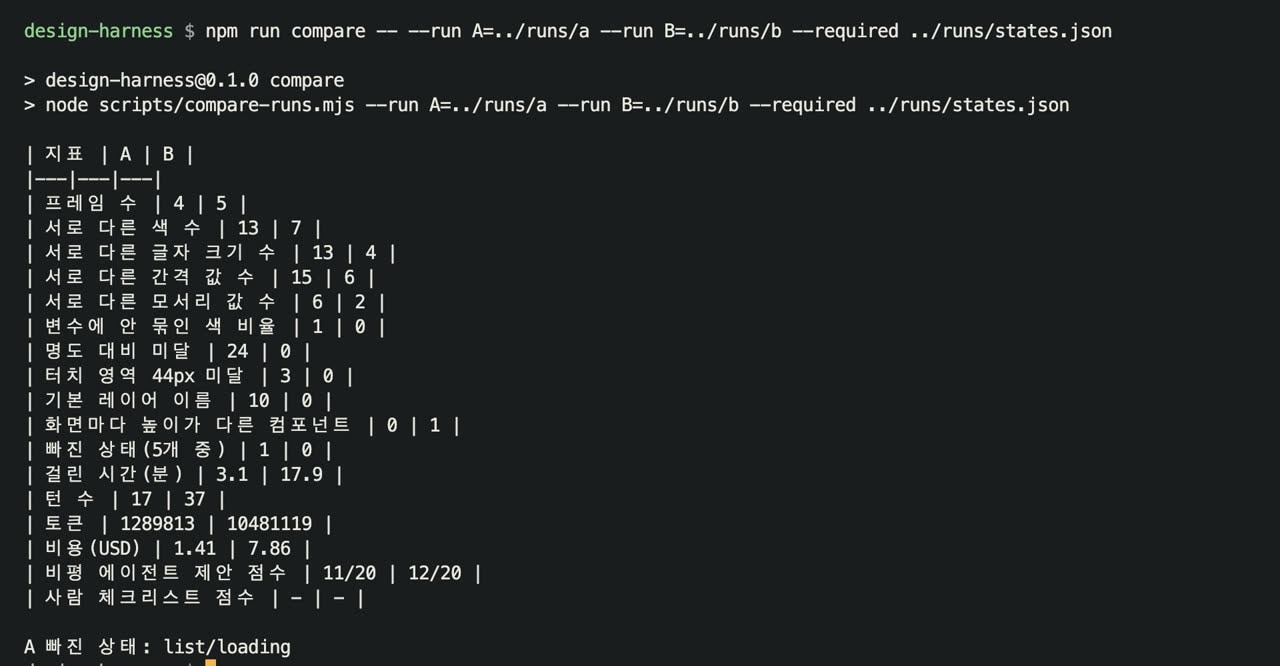
We extracted every layer from both Figma files with the same script and compared them (npm run compare). A had no tokens defined, so instead of "rule violations" we counted how many distinct values each file used.
| Metric [Measured] | A no harness | B harness |
|---|---|---|
| Distinct colors | 13 | 7 |
| Distinct font sizes | 13 | 4 |
| Distinct spacing values | 15 | 6 |
| Distinct corner radii | 6 | 2 |
| Colors not bound to variables | 100% | 0% |
| Text failing contrast | 24 | 0 |
| Touch targets under 44px | 3 | 0 |
Default layer names like Frame 12 | 10 | 0 |
| Missing states (of 5) | 1 (loading) | 0 |
| Agent working time | 3.1 min | 17.9 min |
| Cost | $1.41 | $7.86 |
| Blind critic score | 11/20 | 12/20 |
Consistency and accessibility clearly improved. The cost is on the table too: about 5.8× the time and about 5.6× the money, because the harness organizes the spec, draws wireframes, and stops for human review.
One more number. We gave a critic agent that knew nothing about how the screens were made only the screens and the spec, and asked it to score them. It gave 11 and 12 out of 20, nearly the same. Rules and checks fix consistency and accessibility, but they don't make a design look good. Both runs missed the same issues: no visible data timestamp, list rows that don't look tappable, and the same color for a station with 1 bike left and one with plenty.
3. What the harness looks like: 8 stages, 3 human approvals
Work flows through eight stages:
- Spec → 2. Reference research → 3. Information architecture → 4. Wireframes → 5. Design system → 6. Figma screens → 7. Verification → 8. Handoff to developers
At each stage a script decides pass / fail / not yet. At the three stages in bold, a human must approve before work moves on.
The folder holds five agents that split the work by stage (research, information architecture, design system, Figma operations, critique), skills that bundle the order of steps, and check scripts and hooks. Only the figma-operator agent writes to Figma, and the critic agent proposes scores without fixing anything.
There is one design principle: let machines measure what machines can measure, and let people look only at what machines can't. So for each design technique we asked, "Can this be measured as a number?" If yes, it went into rule files and checks. If not, it went onto a human checklist.
4. Eight design techniques → rules and checks
| Technique | In plain words | Harness piece | What the check looks at |
|---|---|---|---|
| Design tokens | Name values like colors and spacing; screens use only the names | tokens.json + Figma variables with the same names | Is every color bound to a variable? Any color not in the tokens? |
| Type scale | A few font-size steps spaced at a steady ratio | Allowed sizes in tokens | Other sizes are errors; counts steps and average ratio between them |
| 4/8 grid and margins | Sizes and spacing in multiples of 4, consistent side margins | Spacing tokens, 16 on each side | Are auto-layout gaps and padding in the tokens? Positions on 4-unit steps? |
| Contrast | Brightness difference between text and background | WCAG 2.2 criteria | Computes contrast against each text's nearest parent background |
| Touch targets | Big enough to tap with a finger | Tappable components marked in components.json | Error if smaller than 44 |
| State design | Loading, empty, and error screens | Required states per screen in ia.json | Error if that frame is missing in Figma |
| Components and repetition | The same thing looks the same everywhere | Component list | Warns when a component's height or color differs across screens; catches default layer names |
| Microcopy | Short text on buttons and messages | Tone, banned words, and length limits in copy.json | Phrases like "an error occurred" or "sorry" are errors; buttons over 6 characters warn |
We keep track of where each criterion comes from:
- Contrast is a standard, not a rule of thumb. Body text needs at least 4.5:1 against its background and large text 3:1 (WCAG 2.2 SC 1.4.3). Non-text elements like icons and input borders need 3:1 (SC 1.4.11) [Standard].
- 44-point touch targets are what Apple's Human Interface Guidelines recommend [Official docs].
- Five font sizes or fewer, four alignment lines or fewer, and 95%+ spacing-token compliance are targets this harness set, not standards [Rule of thumb].
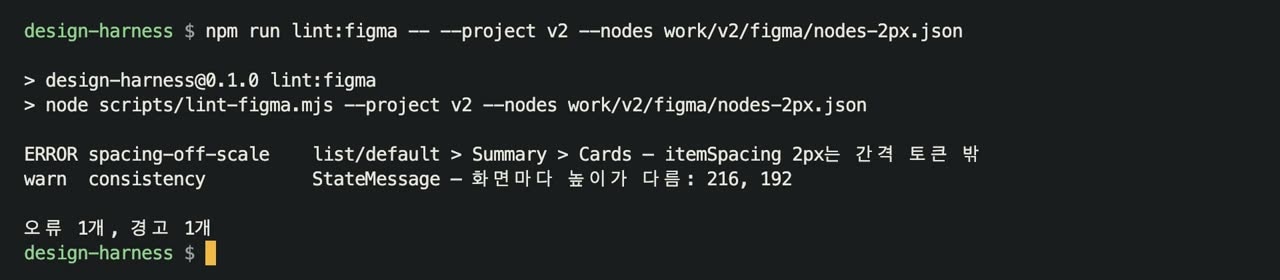
Here is a real catch. While refining, one hand-edited gap between summary cards ended up 2px. Put that state back and run the check, and it immediately errors as "outside the spacing tokens." It's a difference you can barely see. Running every rule on the current screens gives 0 errors, 0 warnings [Measured].
On the other hand, visual hierarchy, showing one key number first, using color only for meaning, and grouping related things are hard to judge by numbers. Those go to a 12-item human checklist and the critic agent. The critic only proposes scores; a person makes the final call.

The last piece is a hook: a command Claude Code runs for you at a set moment. Right before any write to Figma, figma-guard runs first. If you try to create a frame before the design system is approved, it blocks with exit code 2. Writing to a file or team other than the approved one is blocked the same way. The rules don't just live in a document; they're enforced at run time.
5. Versions 1 to 4, and the metrics
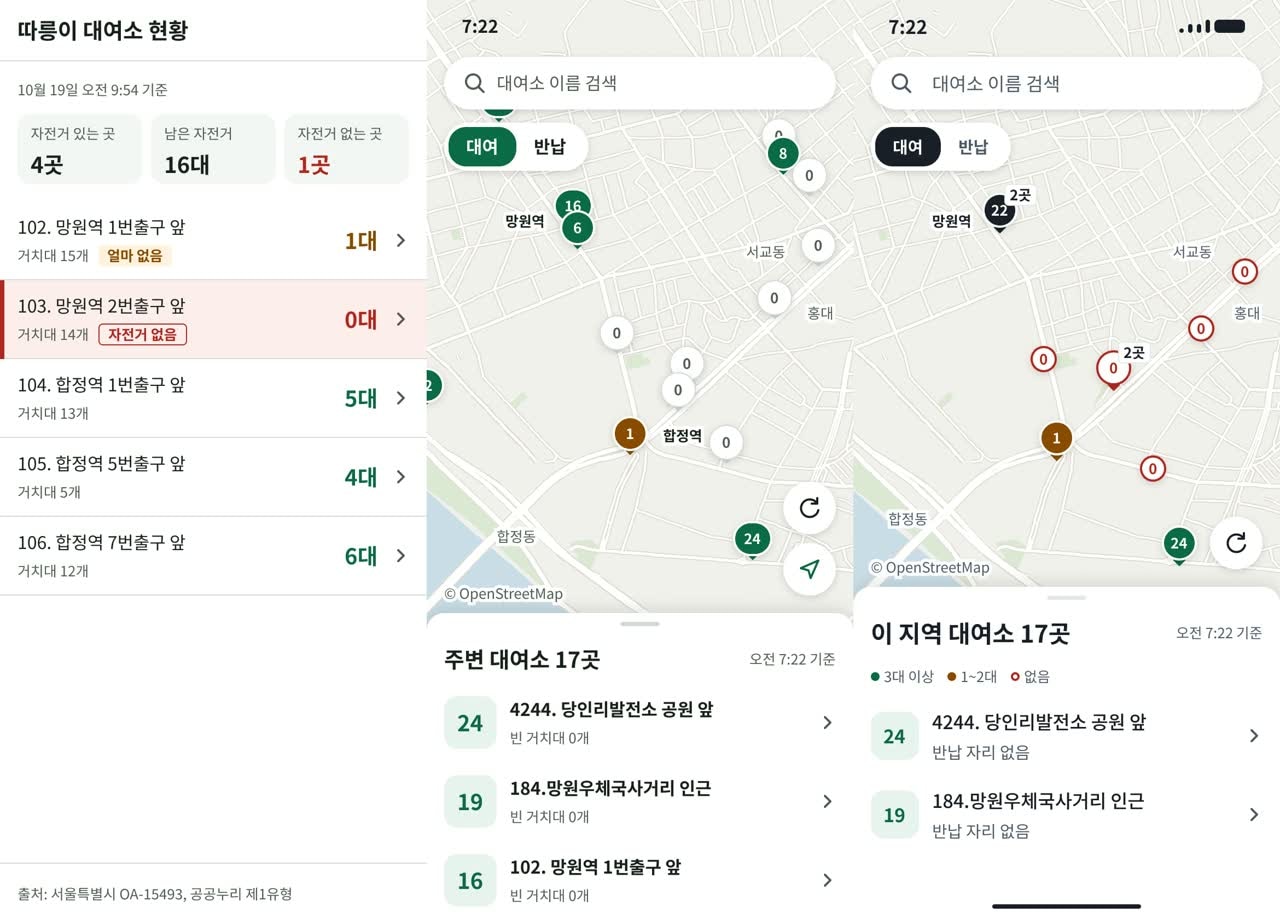
- Version 1 is the harness result (B) shown above.
- Version 2 took the critique and added a data timestamp, right-pointing arrows, an amber "running low" tag for 1–2 bikes, and three summary cards at the top. Along the way the 2px gap was caught by the linter, and two heights off the 4px grid were flagged as warnings and fixed.
- Version 3 switched to a map. Looking at seven real bike-share and mobility apps showed common patterns: numbered pins, a different color for zero bikes, a rent/return toggle, a floating search bar, a bottom sheet, and a data timestamp. The data is a real snapshot of 17 stations around Mangwon, Hapjeong, and Seogyo, and we drew the base map ourselves from OpenStreetMap data.
- Version 4 fixed, one by one, the 12 issues a critic agent raised after seeing only version 3, each mapped to a design technique.
| Critique | Technique | Fix |
|---|---|---|
| Pins overlap | Clustering, collision avoidance | Pins within 28px merge into one with a total and a "2 places" badge |
| Zero-bike pins cover the map | Color only for meaning, visual weight | Zero is a small white circle with a red outline |
| "16 bikes / 15 docks" is confusing | One key number first | One big number, the rest on a secondary line |
| Latitude/longitude decimals | Progressive disclosure | Removed |
| Green button inside an error banner | Visual hierarchy | Red bar plus a text button |
| "My location" button in an app that doesn't use location | Remove false cues | Button removed |
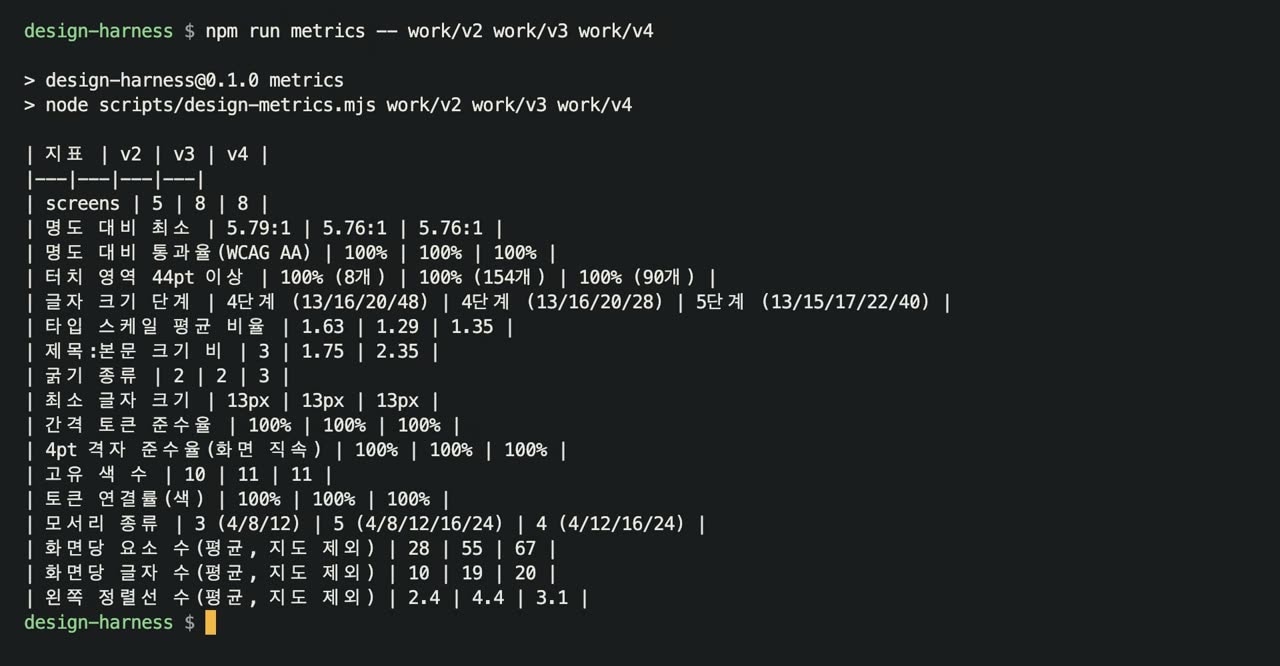
We compare with numbers, not just impressions. npm run metrics computes objective metrics from the Figma nodes [Measured].
| Metric | v2 | v3 | v4 | Criterion |
|---|---|---|---|---|
| Contrast pass rate | 100% | 100% | 100% | 100% [Standard] |
| Lowest contrast | 5.79:1 | 5.76:1 | 5.76:1 | 4.5:1 or more [Standard] |
| Touch targets ≥ 44pt | 100% | 100% | 100% | 100% [Official docs] |
| Font-size steps | 4 | 4 | 5 (13/15/17/22/40) | 5 or fewer [Rule of thumb] |
| Type scale average ratio | 1.63 | 1.29 | 1.35 | Reference |
| Left alignment lines per screen (excl. map) | 2.4 | 4.4 | 3.1 | 4 or fewer [Rule of thumb] |
Alignment lines are the vertical lines where text and cards start. They rose to 4.4 in version 3, then dropped to 3.1 in version 4 after we moved the search text into the same column as the list names.
6. When the checker was wrong
Version 3 produced 11 warnings, and most were the checker's fault. It treated the base map layer, which is bigger than the screen, as a grid violation, and it measured buttons aligned to the right margin against a left-based grid.
We didn't bend the design to satisfy the check. We fixed the rule, then kept that case as a test. Running npm test passes all 13 [Measured].
7. Drawing in Figma for free: Talk to Figma
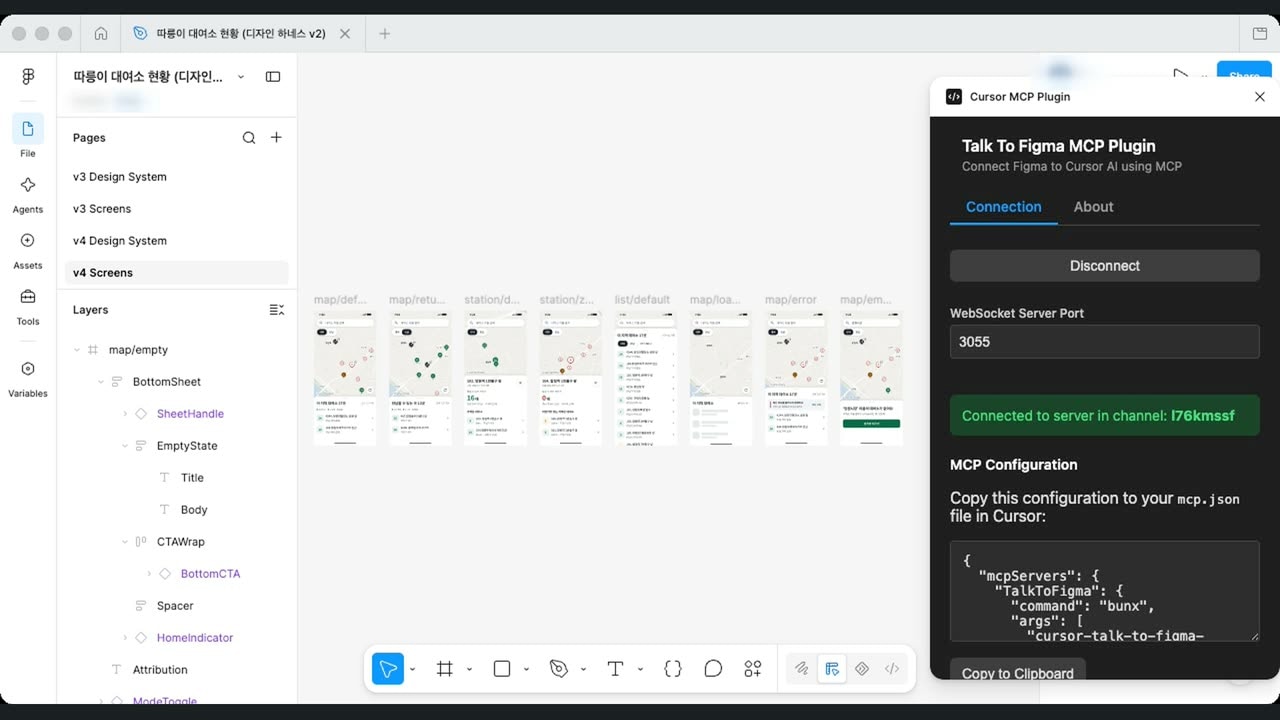
Figma's official MCP has a call limit on the free plan, so repeated revisions hit it quickly. In fact, the final revision in this experiment stopped because of that limit. From version 2 on, we used the open-source plugin Talk to Figma (grab/cursor-talk-to-figma-mcp), which is MIT licensed.
Here's how it works:
- Turn on the plugin in the Figma desktop app and connect it to a relay server open only on this computer; it shows a channel name.
- Send commands to that channel from the terminal, and the plugin runs them inside Figma.
- The original plugin only runs a fixed set of commands. In our local copy we added one command,
run_script, that runs plugin code as given.
Setup is just loading the plugin from its manifest file under Plugins → Development. With the version 4 screens page cleared, sending the drawing script to the channel redraws all eight screens, from the map to the list, in a few seconds. Pin clusters, the timestamp, and the rent/return toggle are all drawn with components and variables, and the whole run made zero official MCP calls [Measured].
8. Limits
- Rules don't make a design look good. The blind critic scores were nearly identical, 11 vs. 12.
- It's expensive. About 5.8× the time and 5.6× the cost. If you just want a quick look at one small screen, a harness is overkill.
- Each run happened once. These are single A and B runs, not averages over repeated trials. The human approval steps in B were answered by the person running the experiment.
- Some defects slipped past the machine checks. A source caption broke a line mid-word, and the detail screen showed the dock count twice; both passed.
- The rule-of-thumb numbers (five steps, four alignment lines, and so on) are this harness's targets, not the right answer.
To sum up the order: one, hand the job over once without a harness and measure the result. Two, turn the measurable techniques into tokens, rule files, and lint. Three, leave hierarchy and impression, which can't be measured, to human approval and critique. Four, when the checker is wrong, fix the check, not the design, and keep it as a test. Rules protect consistency and accessibility; on top of that, people choose what good design is.
Watch the video
We walked through the same process with the real terminal and Figma on screen in a Korean-language video.
Sources
- Seoul Metropolitan Government, Seoul public bike real-time rental information (OA-15493) — KOGL Type 1
- W3C, WCAG 2.2 Understanding SC 1.4.3 Contrast (Minimum) · SC 1.4.11 Non-text Contrast
- Apple, Human Interface Guidelines — Buttons
- Design Tokens Community Group, Design Tokens Format
- Nielsen Norman Group, Progressive Disclosure
- grab/cursor-talk-to-figma-mcp — MIT
- Base map: © OpenStreetMap contributors (ODbL)