

We asked for one presentation site: a page with a 3D globe, a trends dashboard and a policy research brief. Claude split the job into three sessions running at the same time. When they finished, each reported back to the original conversation, and Claude merged the results into one page.
This is nested sessions, added to the Claude desktop app on October 15. Here is exactly how it went when we tried it.
This post covers:
- What nested sessions are
- Handing over a whole presentation site
- The nested sessions' reports and the finished site
- Environments, from the same update
- Idle compaction in Claude Code
- Limits
How to read the numbers. [Official docs] means Anthropic's own changelogs. [Measured] means we ran it ourselves on this Mac. We used Claude desktop app 2.42304.0 with Opus 5.5.
1. What nested sessions are
A session is one thread of conversation with Claude. Until now, one session meant one conversation. Give it a big job and it worked through everything in order inside that one conversation, which kept getting longer.
With nested sessions, Claude can start part of the work in a separate session [Official docs].
- The nested session appears under the original session in the sidebar.
- When it finishes, it reports back to the original session.
- In Settings > Claude Code you choose what happens when you ask for an unrelated task.
- It shipped in the October 15 release (v2.42304.0, bundling Claude Code 2.1.299) (Claude app changelog).
Two things make this useful. A nested session starts from a clean conversation, so the original one does not grow. And unrelated tasks run at the same time.
2. Handing over a whole presentation site
The input was World Bank open data: population ages 65 and above, life expectancy and country locations (capital latitude and longitude), saved in an aging-briefing folder.
We wrote one request, in plain everyday language:
- Build a microsite for next week's presentation. The topic is global aging.
- (1) Each country's share of people 65+ as bars on a 3D globe, (2) a 1990–2023 trends dashboard, (3) a research brief on the latest aging policy in Korea, Japan and the US (source links required).
- The three are unrelated, so run each in its own session at the same time, then merge them into one
index.html.
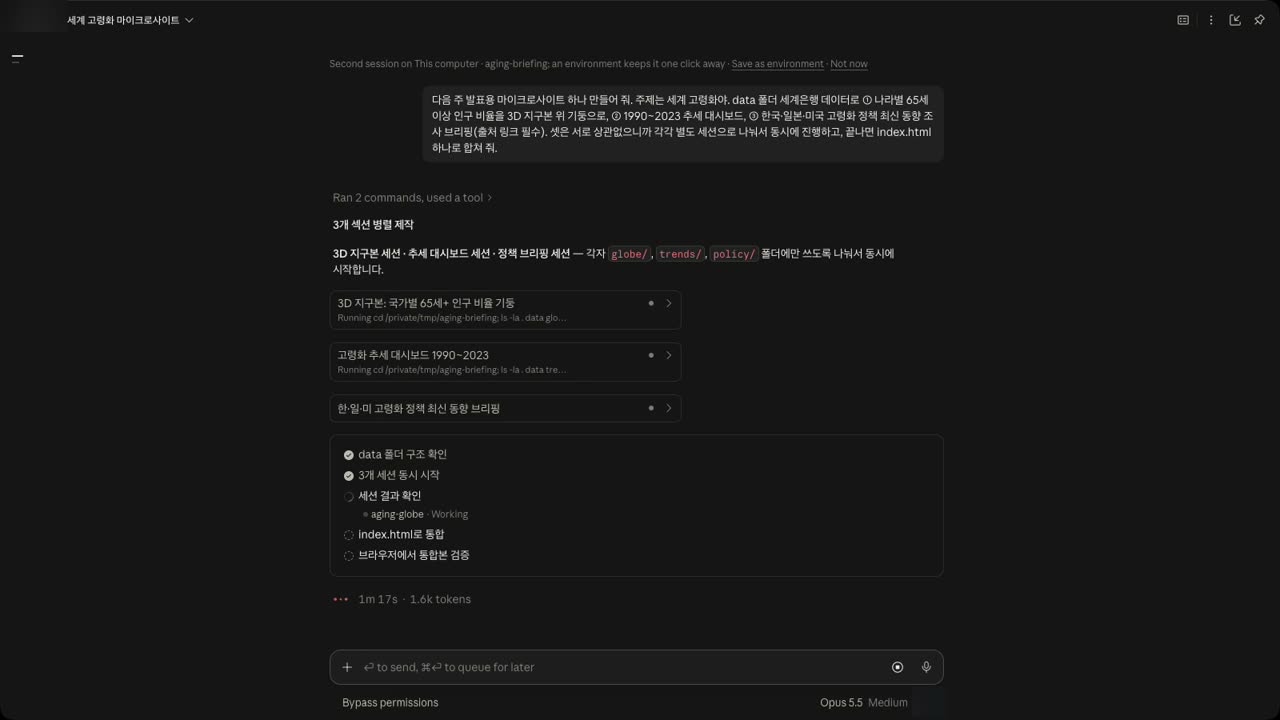
Claude made a plan first: check the data → start three sessions at once → review the results → merge into index.html → verify in a browser.
One detail stands out. All three sessions share the same folder, so Claude told each one to write only to its own subfolder (globe/, trends/, policy/). That way they could not overwrite each other's files. It also told them to match colors, fonts and the dark background so the three parts would look like one site.
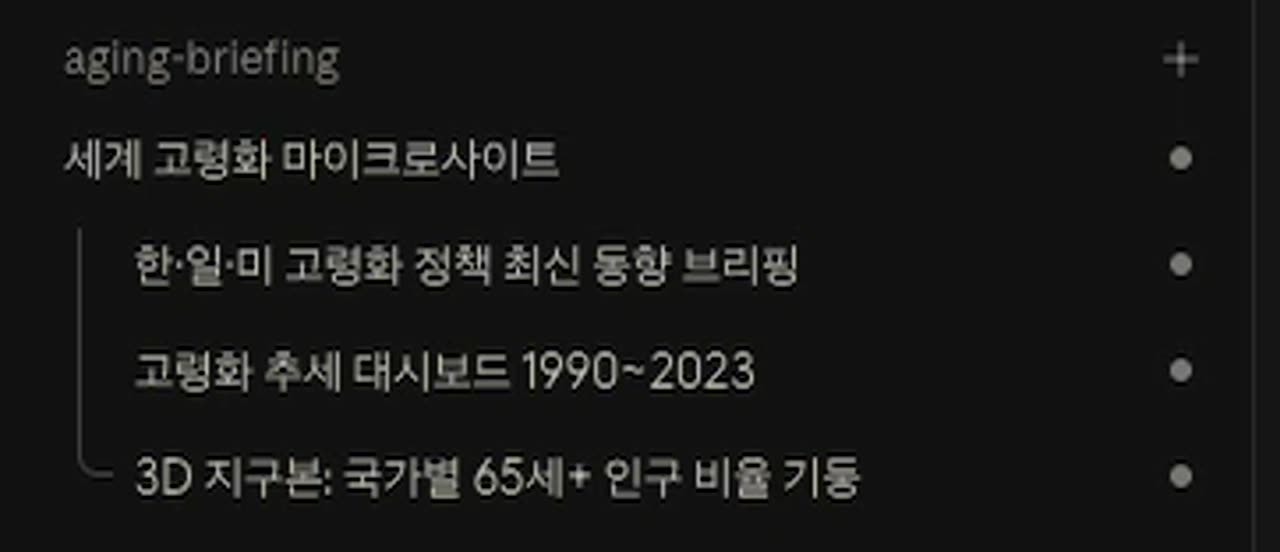
In the sidebar, the three sessions sit one level in, under the original session, "World aging microsite."
While they work, the original session waits. The nested sessions took about 8 minutes. From pressing Enter to the merged page checked in a browser took about 12 minutes 40 seconds [Measured].
3. The nested sessions' reports and the finished site
When the three sessions finished, three reports came back to the original session. It reviewed them, built index.html, served it on a local server and checked it in a browser. The final report also said it had checked the numbers against the source data.
Open the policy research session and its work is all there.
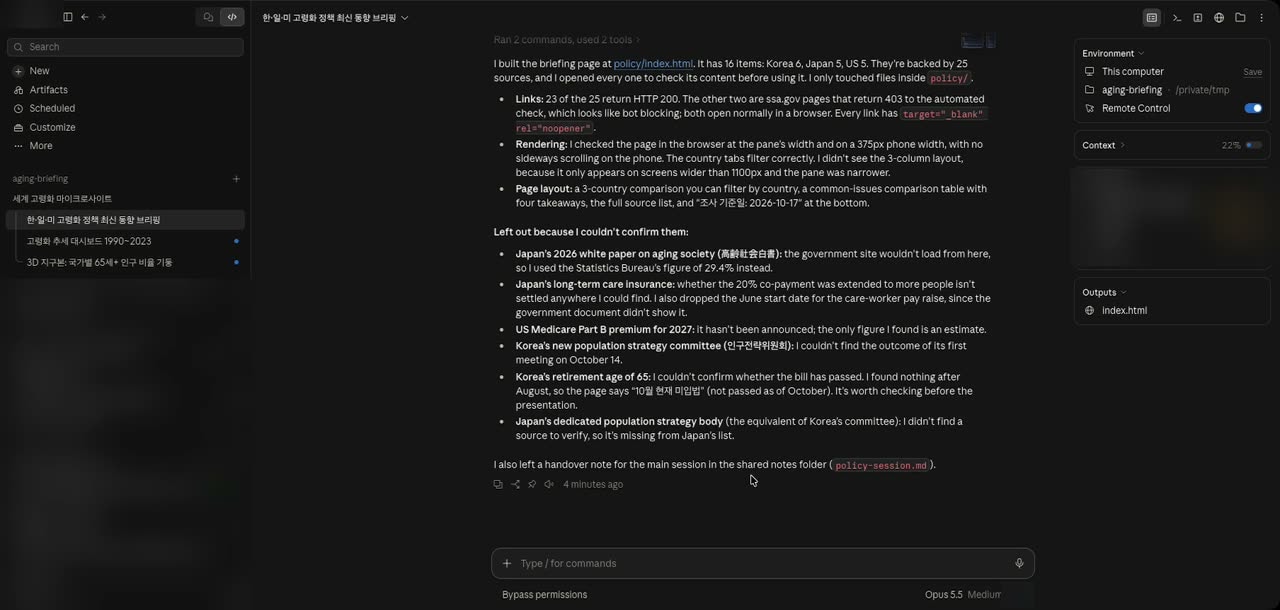
- It reported opening all 25 sources to check them. 23 passed the automated check (HTTP 200). Two US Social Security Administration (ssa.gov) pages blocked the automated check (403) but opened in a browser [Measured].
- Items it could not confirm were listed separately. It did not make things up; it marked what it did not know.
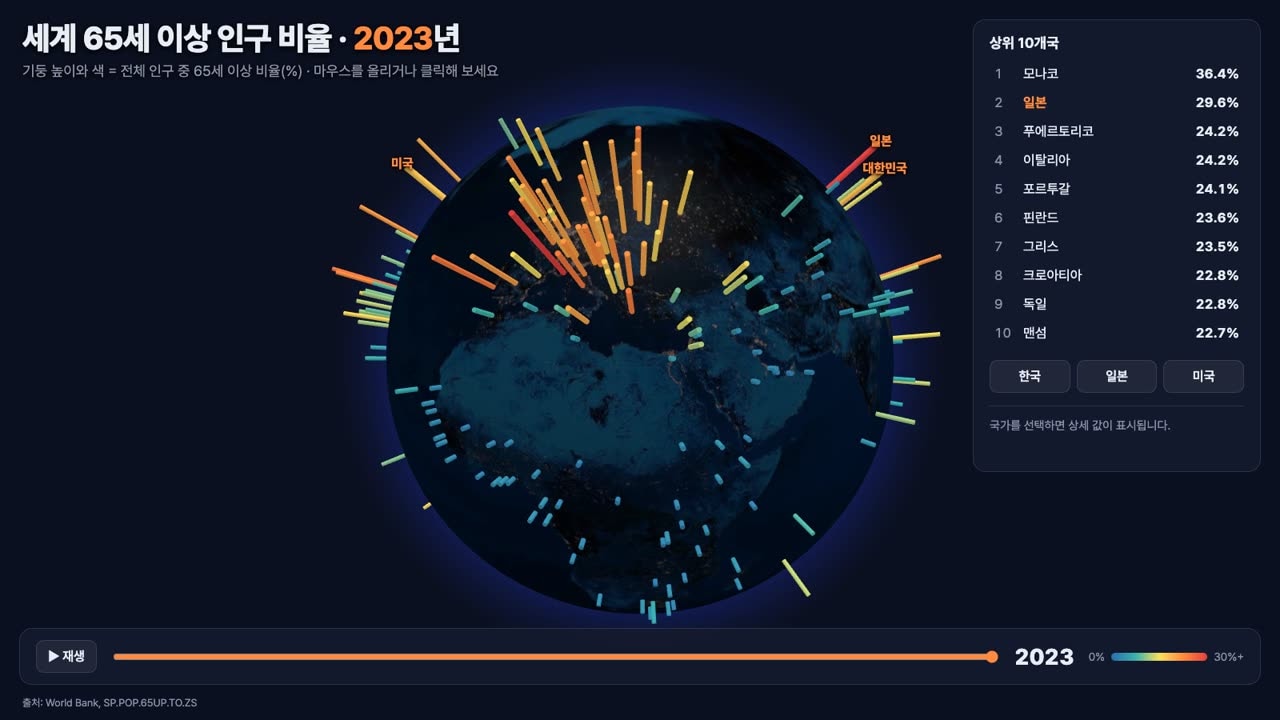
The finished site is a single page. At the top, each country's 65+ share stands as a bar on a 3D globe you can rotate with the mouse.
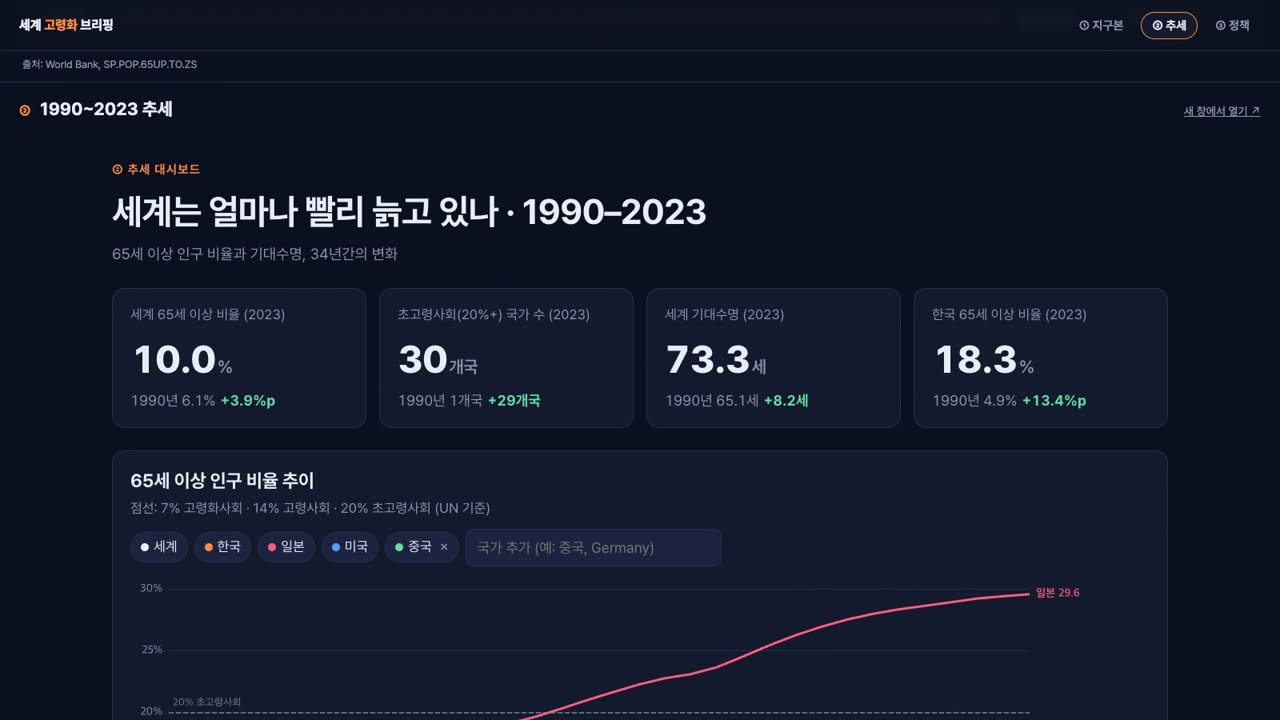
Scroll down for the 1990–2023 trends dashboard, followed by the Korea, Japan and US policy brief.
We asked once. Claude did the splitting, the reporting and the merging.
4. Environments, from the same update
An environment is a saved place to start sessions from. You can save a folder, an SSH host, a cloud environment or a Remote Control machine, with a worktree and branch setting for each folder [Official docs].
At the top of a session there is a hint that saving an environment keeps it one click away, next to Save as environment. Click it and a window opens to save where this session started.
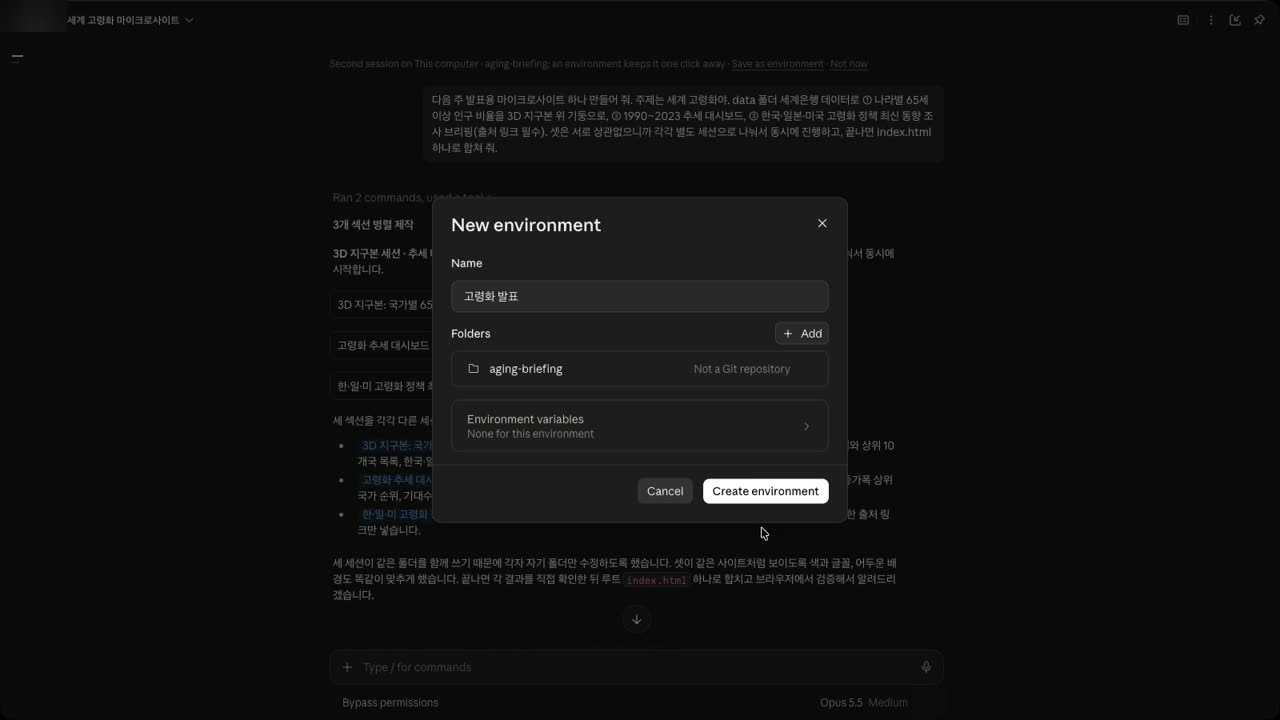
- You set the name, folders and environment variables in one place.
- Environment variables have lived on each saved environment since the October 8 update (v2.31226.0) [Official docs]. So each project can keep its own keys without mixing them up.
Name it, create it, and the next time you open a new session you can pick it straight from the environment list.
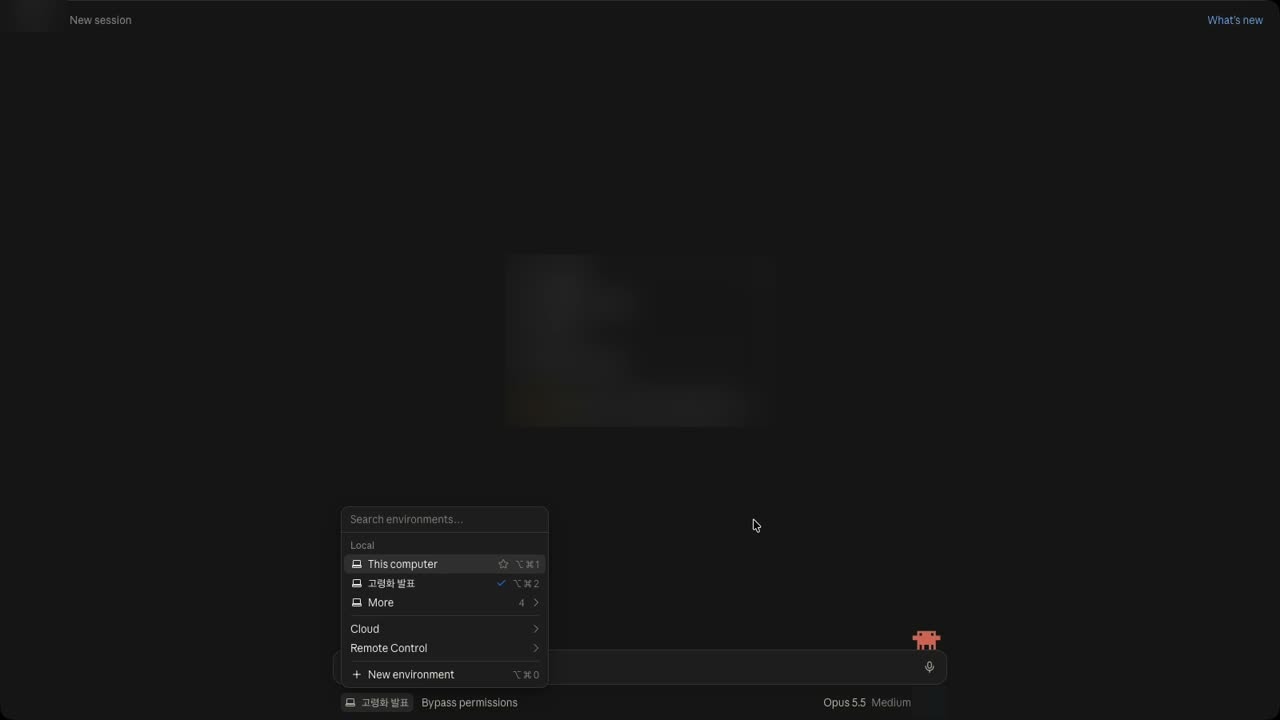
The sidebar is also grouped by saved environment, or by folder or repository when there is none [Official docs].
5. Idle compaction in Claude Code
Claude Code 2.1.299, bundled in the same desktop update, added idle compaction.
Some background first. Claude keeps the early part of a conversation in a prompt cache, so it does not have to reprocess what it has already read. That cache expires after an hour, and then your next message reprocesses the whole long conversation.
- In the terminal, a conversation over 200K tokens left idle for about 54 minutes is compacted (summarized) before the one-hour cache expires [Official docs].
- To turn it off, put
"idleCompaction": falseinsettings.json.CLAUDE_CODE_IDLE_COMPACT_MIN_TOKENSchanges the 200K minimum [Official docs]. - From 2.1.302, the Idle compaction row in
/configturns it off or back on [Official docs]. - In 2.1.314 it was added to VS Code and the Claude desktop app's Code tab as well [Official docs] (Claude Code changelog).
Takeaways
- A big job made of unrelated parts can be handed over in one request. Claude splits it into sessions, they appear under the original one, and the results come back to it.
- When sessions share a folder, giving each its own subfolder is the safe choice. Claude did that on its own here, but saying it in the request makes it certain.
- Save folders you open often as environments, so a new session is one pick away.
Limits of this test
- This is one request, on one Mac, for one task (a presentation site). How Claude splits work, and into how many sessions, can vary with the request.
- We did not separately fact-check the policy brief's content here. We only describe how the nested session reported checking it.
- As of the October 15 release, nested sessions and environments were not yet in third-party deployments [Official docs]. Changes keep coming, so check the latest changelog for the version you use.
Watch the video
We walked through the same steps in the real app in a video. The video is in Korean.
Sources
- Anthropic, Claude app changelog — v2.42304.0 (2026-10-15) nested sessions, environments, sidebar grouping; v2.31226.0 (2026-10-08) per-environment variables
- Anthropic, Claude Code changelog — 2.1.299 idle compaction, 2.1.302
/configrow, 2.1.314 VS Code and Code tab - World Bank, Population ages 65 and above (% of total population)
- World Bank, Life expectancy at birth, total (years)