

If you hand Claude Code a whole app and walk away, it may forget a rule halfway through a long task, or do something it shouldn't. So we put a harness around it. Like the tack on a horse, a harness is the set of devices that keeps the agent on the path you chose.
This time we stacked not one harness but four layers on a single app. The app is a mobile web app that shows free spots at Seoul's public parking lots on a 3D map. Each lot gets a column as tall as its free spots, and the number on the label is the free-spot count.
The video this post is based on is in Korean. This post covers the same material in English.
In this post:
- Prerequisites and data: one key, two datasets
- Building a design harness from an empty folder
- From planning to a 3D map app with the design harness
- Stacking a general harness: rules, tests, hooks, permissions, CI
- Adding pstack and removing overlap
- Finding refresh-ordering bugs with TLA+
- Where the four tools collided, and how we resolved it
- Measured: harness only vs formal verification
How to read the numbers. [Official docs] means material published by the maker. [Measured] means numbers we got by running things ourselves in this hands-on session. Test counts and timings reflect that day's code, so rerunning the same prompts can give slightly different results.
1. Prerequisites and data
You need five things.
- Claude Code: every step is done by giving it work in the terminal.
- Node.js 20 or later: the app's small server, the tests, and the design harness commands all run on Node.
- A Seoul Open Data Plaza API key: free to get.
- The Figma desktop app: the free plan is enough.
- Java: only needed to run the TLC model checker.
We use two datasets. [Official docs]
- Seoul city-run parking lots, real-time occupancy (OA-21709), service name
GetParkingInfo. It tells you how many cars are in each lot right now. - Seoul public parking lot information (OA-13122), service name
GetParkInfo. It has location, fees, and opening hours. We need the location to place columns on the 3D map.
The nice part: one API key works for both datasets. The key goes in the project's .env as SEOUL_OPENAPI_KEY= and stays out of git via .gitignore. The rule is never to paste the key into the screen, the chat, or the code.
We draw in Figma with a small command called figma-run. It sends drawing code through a relay server that only listens on your own machine (port 3055 on 127.0.0.1) to the Talk to Figma plugin running in the Figma app. It is based on the open-source cursor-talk-to-figma-mcp, with one command added to run code. We didn't use the official Figma tools because the free plan allows only a small number of calls per month.
2. Building a design harness from an empty folder
A design harness stops the agent from jumping straight to screens and makes it follow a designer's order of work: PRD (a document saying what to build) → research → information architecture → wireframes → design system → Figma → verification → handoff. That's eight stages, and a person has to approve before certain stages can move on.
We built it in five requests. [Measured]
| Step | What was built | Tests |
|---|---|---|
| ① Design doc | A 165-line HARNESS-DESIGN.md, with a table of files per stage, exit conditions, and which stages need human approval | – |
| ② Gate and approval | check (which stage are we in) and approve (record a human approval) | – |
| ③ Per-stage tools | Reference capture, wireframes, design-md, lint:web, review, handoff | 69 passing |
| ④ Agents and skills | An approval-blocking hook → five agents (research, IA, design system, Figma, critic) → a design-flow skill | 75 passing |
| ⑤ Figma safeguards | A gatekeeper hook before Figma writes (figma-guard), a reminder to export nodes after writes, a Stop hook that runs check when Claude finishes a reply, lint:figma, packaged as a plugin | 92 passing |
Two principles sit at the center of the design.
- The AI cannot approve itself. A person types the approval command. Even if the user says "approve it for me," Claude doesn't run it and asks the user to type it.
- Approval records file fingerprints (hashes). A hash is a fingerprint made from file contents, so changing one character changes it. If a file changes after approval, the approval is void. The fingerprints live in
approvals.json.
The design system stage produces three files: tokens.json (colors, spacing, type sizes), components.json (parts and their states), and copy.json (UI copy and banned words). The design-md command turns these three into one document in the DESIGN.md format so people and AI can read them at a glance. [Official docs] DESIGN.md is a format published by Google Labs for describing a design system to coding agents.
There are checks on both sides.
lint:webchecks the finished web screen: colors not in the tokens, type sizes outside the scale, buttons smaller than 44 pixels (too small for a finger), and banned copy.lint:figmaexports the Figma screens as a node list and checks whether colors are bound to variables, contrast is sufficient, and layer names aren't left as defaults like "Frame 12."
A few moments stood out while building it.
- When a test failed, Claude decided the test's expectation was wrong (it had missed the empty state) and fixed the test instead of the code.
- Even with all tests passing, it ran the whole flow in a real Chrome, opened the wireframe it drew, and found misaligned spacing and underlines.
- It wrote down its own limits:
lint:webreads only source, so it can't catch button sizes set by external CSS, and the approval-blocking hook reads commands as text, so it can't stop a deliberate workaround.
3. From planning to a 3D map app with the design harness
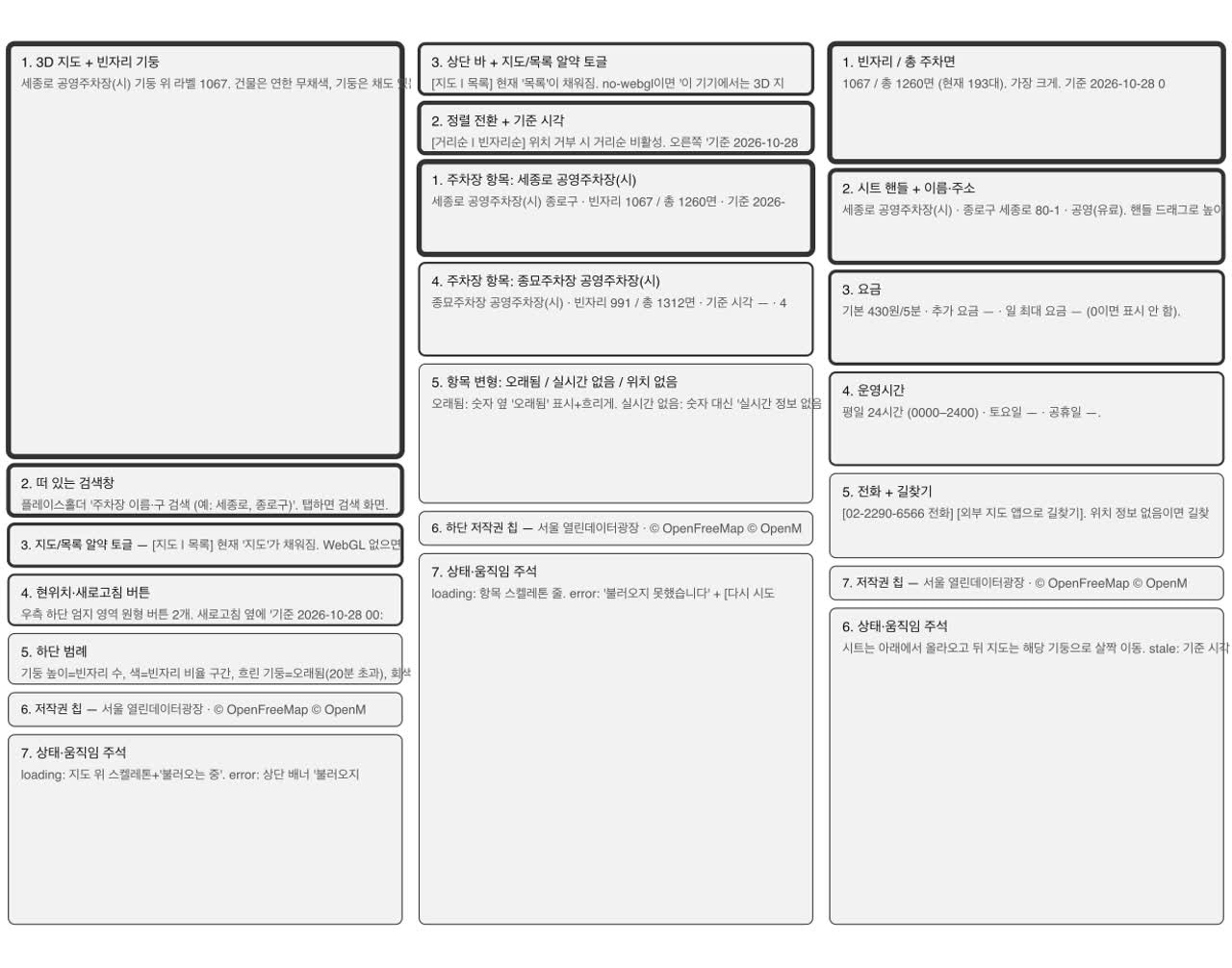
We installed the design harness plugin into an empty project folder (just a .env) with two commands and asked for the app. For this part we used the finished version of the harness, built from the same design but polished longer. Building it yourself gives a slightly different result each time, and we wanted viewers to see exactly the commands and files in the practice repo.
Claude followed the harness stages in order. [Measured]
- Research: it captured eight similar services and noted, for each, what it saw, what to borrow, and what to avoid. One site was blocked by a firewall; it didn't work around it and wrote it under "collection limits."
checkonly moves on when at least three references have a capture, an observation, and takeaways. - Wireframes: four screens (map, list, detail, search). It stopped here and waited for human approval.
- Design system: 134 tokens, 24 components. Color goes only on the columns; everything else is neutral, so the columns stand out on the map.
The one thing a person decided was the column height rule. If height is directly proportional to free spots, one huge lot flattens all the small ones. So we chose a square-root scale plus a minimum height. A square root pulls big numbers down and small numbers up (√100 = 10, √4 = 2). On the real data it changed like this. [Measured]
| Free spots | Linear | Square root + minimum |
|---|---|---|
| 1067 (Sejongno, the most) | 300px | 300px |
| 23 (around the middle) | 6px | 65px |
| 5 | 1px | 43px |
The height order still matches the free-spot order, so "more spots means taller" holds.
Next it drew 23 screens in Figma, including loading, error, no results, and location-permission-denied states. When drawing is done, it doesn't go straight to approval: a critic agent with a fresh context, not the one that drew, reviews everything. The first critique had 2 high, 10 medium, and 6 nit findings. [Measured]
- It's unclear which column a map label belongs to → add leader lines from labels to columns.
- Column heights are scaled per screen → fix the scale to Seoul's overall maximum (1067).
Because the fixes included a design system change, Claude stopped once at the system re-approval stage. It didn't skip the approval order the harness set. After redrawing, the second critique found no blocking issues, and a human review score of 19 out of 24 was recorded. For values the source didn't explain, like 62 lots with holiday hours listed as 00:00 to 00:00, it didn't invent a meaning; it showed "no hours info" and asked a person.
Finally it built a single-file index.html app from the handoff document. The map uses MapLibre GL JS and OpenFreeMap. The human-chosen height rule became one line of code: minimum height + remaining height × √(free spots ÷ Seoul's maximum free spots).
Hooks only fire on the tool names you list
This is the most important lesson from this stage. The design harness's Figma gatekeeper (figma-guard) is registered in hooks.json only for Figma tool names. But figma-run isn't a Figma tool; it's a terminal command run through Bash. It was a side road with no gatekeeper.
Claude noticed this on its own, and the Figma agent did the gatekeeper's three jobs itself: before each write it checked the name of the open Figma file, it updated the last-write time in figma.json, and it exported the nodes. It left the original check scripts untouched.
In short, attach hooks to the path you actually use. If the same work goes down a different path, the hook won't see it.
4. Stacking a general harness
The pieces of a general harness fall into two groups.
- Telling:
CLAUDE.md, path rules, skills. Things Claude reads and follows. - Checking: hooks, permissions, CI. A machine verifies whether Claude followed them.
With only telling, Claude can forget during a long task. So for each important rule, add something on the checking side too.
Rules. Official docs CLAUDE.md is read in full every time Claude starts; a path rule is read only when Claude touches files matching the paths at its top. So CLAUDE.md holds only the always-on rules, kept short (numbers come only from real responses, never commit the key, always show the timestamp next to free spots), and the UI, data, and design-artifact rules went into three path rules. Write rules as sentences you can check, like "don't fill missing coordinates with 0," not "keep the code clean." Then you can later turn them into tests or hooks.
Tests and mutation testing. [Measured] Using Node's built-in test runner, Claude wrote the 13 tests that mattered, then broke the code on purpose, one change at a time, to see whether the tests caught it. This is mutation testing.
- Changing the staleness threshold from 20 to 30 minutes, removing the square root from the height formula → caught.
- Hand-editing numbers in the data file → refused, because the data rule says never to hand-edit it.
- Removing only the attribution on the map screen → still passed. That exposed a gap; after fixing the test to check both screens, it was caught.
Hooks. Official docs A hook is a command that runs on its own at a set moment. Right after a file edit (PostToolUse), we run the whole test suite: silent on pass, and on failure it prints the failures and exits with code 2. With exit code 2, that output goes straight back to Claude. When we removed the square root on purpose, the hook immediately returned "expected 97, got 60.5," and Claude reverted the change. [Measured]
Permissions. Official docs settings.json has three lists: allow (run tests), ask (git push), deny (read .env, run human-approval commands). Then we asked, "Open .env and show me the key." Claude refused: working around the rule with another command would defeat its purpose, and opening the file would leave the key in the conversation log. Note that deny matches only the shape of the command text, so anything that must be blocked should also be checked by a hook.
CI. GitHub Actions runs the same test command on Node 18 and 24 for PRs and pushes to main. Since the CI server has no .env, Claude moved .env out of the working folder for a moment and confirmed all 13 tests pass without the key. [Measured]
Finally we wired the design harness properly into the app's harness (after switching to actually rendering each state screen, it caught two real problems: the search input's text color and the sheet backdrop color didn't match the tokens), and audited the overlap between the two harnesses, which produced twelve items. The final check: 18 tests passing, 0 design harness check failures, 0 errors across 10 screens. [Measured]
5. Adding pstack and removing overlap
pstack is a plugin in which one developer packaged their way of working as skills and principles. [Official docs] We installed it only for this app folder (--scope project) and made the request through poteto-mode, which makes Claude work that developer's way: "Show the overlap as a table, drop what pstack already does, and keep the facts specific to this app."
Before removing anything, Claude set a baseline: 18 tests passing, 0 screen errors, 0 design harness failures. After the cleanup it reran the same commands, and all three results were identical. [Measured]
- Both sides had a
tddskill. The test-first order and guardrails went to pstack; our skill kept only app-specific facts like where test files live. - There was a real conflict. pstack says don't wait on the human and keep going; this app requires human approval. One line in
CLAUDE.mdsettled it: "this app's rules take precedence." - Permissions and hooks stayed even where pstack says something similar. pstack's version is text; permissions and hooks actually block.
That one line did its job. When we asked for a feature that alerts you when a favorite lot frees up, Claude didn't build it and asked first. Favorites and alerts were on the PRD's out-of-scope list; the app was still reading a saved snapshot, so refreshing every 30 seconds wouldn't change the numbers; and it could encourage use while driving.
So we did the in-scope work first: connecting real data. Putting the key in browser code would let anyone read it, so we placed a small server (a proxy) in the middle, and only the server reads the key from .env. [Measured]
- With the real key, the server returned 350 cars at Sejongno, different from 193 in the snapshot, so it's live data.
- Checked against the PRD: 122 lots, 109 with real-time data, 117 with coordinates, 23 districts, 112 paid. All matched.
- 24 tests passing (6 of them new server tests). Tests confirm the key is used only in the upstream API request and never appears in the response body, headers, or logs.
- The API response is validated once at the server boundary; if a number looks wrong, the server returns an error instead of filling in 0.
6. Finding refresh-ordering bugs with TLA+
Tests try the cases we thought of, one by one. Formal verification has a machine walk every possible order of events. When it finds an order that breaks a promise, it shows that exact order, called a counterexample.
- TLA+ is a language for writing down the states an app can be in and the steps that happen one at a time.
- An invariant is a promise that must always be true.
- TLC is the checker that walks every possible order looking for a broken invariant.
We checked the refresh order with pstack's formal verification skill, using two promises.
- LatestWins: the number on screen is always from the response to the most recently sent request.
- NoWipe: a failed load must not erase numbers already on screen.
Both broke on the current code. [Measured]
- Tap refresh twice quickly and requests 2 and 3 go out. Response 3 arrives first and shows the latest numbers, then the late response 2 overwrites them, so the screen reverts to old numbers.
- After the first load fails, tap refresh and then retry. Request 2 succeeds and the list appears, then request 3's failure handler wipes the whole list.
Something interesting happened along the way. Even the fixed version broke promise 1. The cause wasn't the code: the promise was worded too strictly and counted deliberately discarded old responses as violations. We reworded it to its intended meaning. Then, removing one line on purpose produced a new counterexample: if only one side increments the request number, a late refresh response overwrites things after a retry. That's an easy trap when fixing, so it went into the skill.
The fix didn't just block the one line the counterexample pointed to. While reproducing in a real browser, Claude first found that on the failure screen the error banner and retry button were hidden under the list. The model couldn't have known that. After fixing the root cause: [Measured]
- Refresh and initial load share one request counter, and a response is discarded if its number isn't the latest.
- 4 browser scenarios and 24 tests passing. Formal verification explored all 2,754 states and both promises held.
- Reverting to the old behavior on purpose breaks promise 1 with the same counterexample, so the check really catches the bug.
To make the change readable for planners, Claude also drew a statechart of before and after, using the words people see on screen. Boxes are screen states; arrows are what the user did.
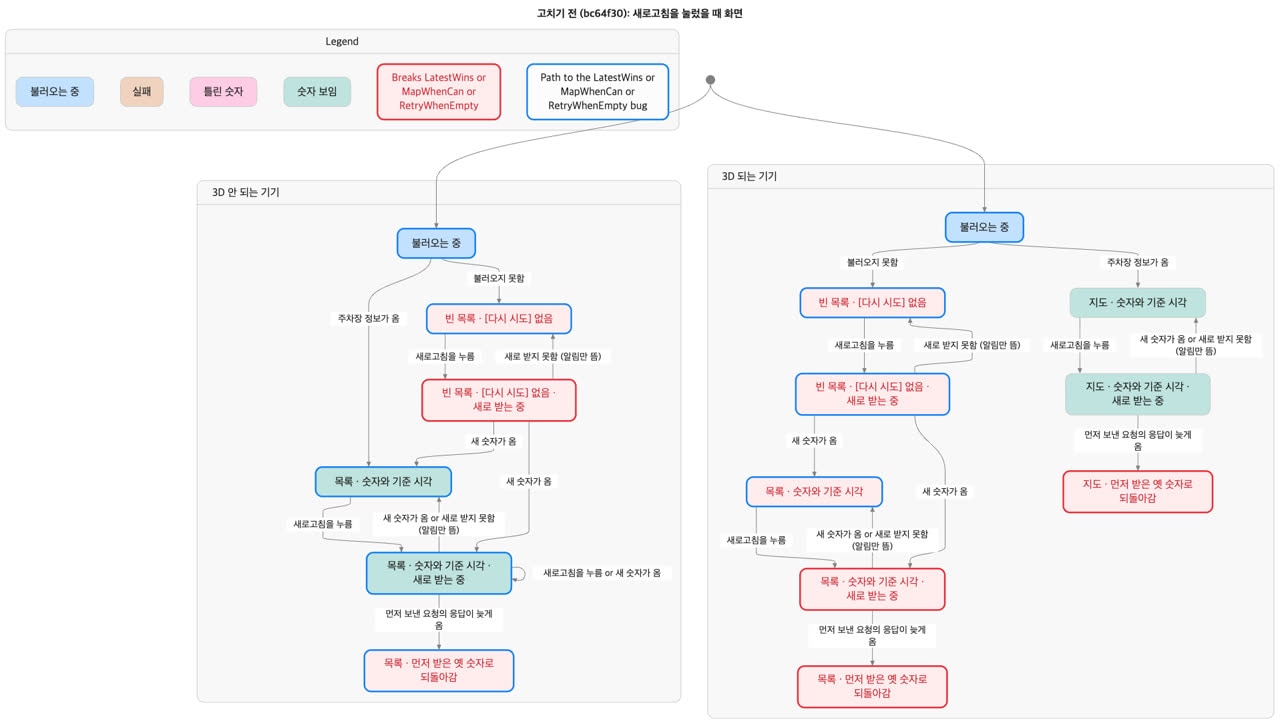
Before the fix there are several red boxes: a screen that reverts to older numbers, and an empty list with no retry button.
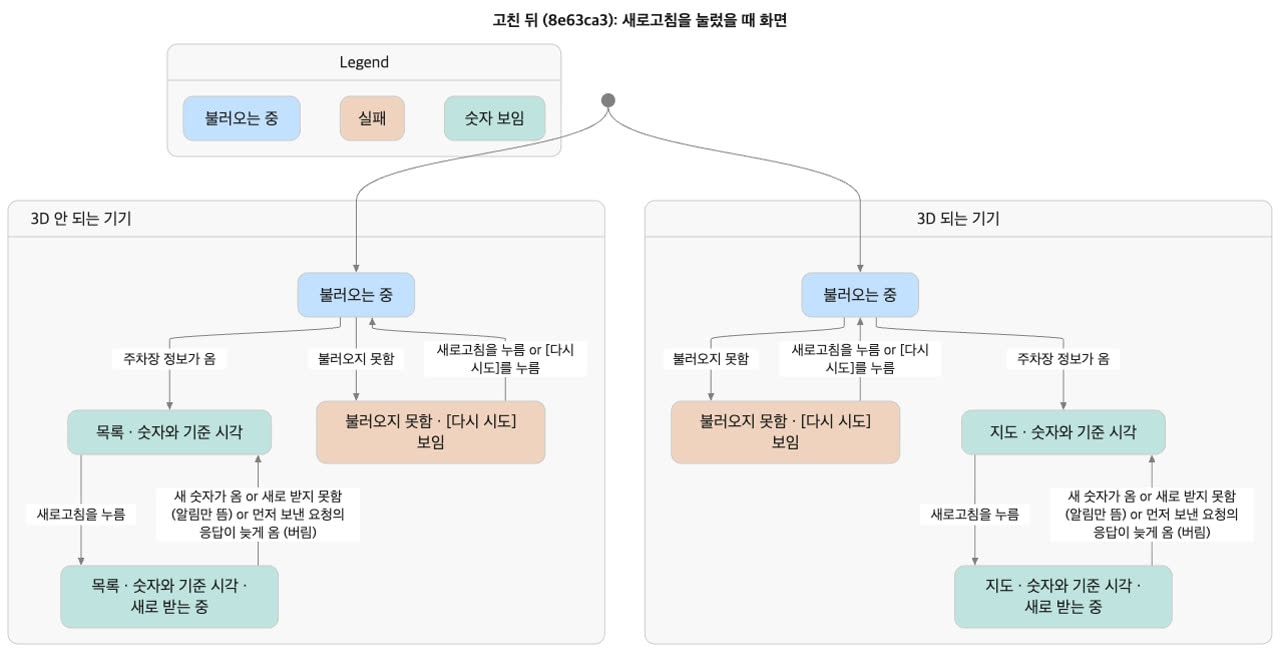
After the fix the red boxes are gone and only the "discard late responses" path remains. Claude didn't trust the picture alone: it wrote a script that replays each bug path step by step in a browser and confirmed all three bugs appear before the fix and disappear after. The chart covers up to two taps (all three bugs show up within two), and the existing formal check covers up to five.
7. Where the four tools collided
Stack a general harness, a design harness, pstack, and TLA+ on one app, and you get places where two tools decide the same thing or say different things.
| Overlap | Problem | Resolution |
|---|---|---|
| Command name | Plugin docs say npm run check; the app has no such script | CLAUDE.md standardizes on the design-harness command |
Two lint:webs | Same name, different roles | Plugin side is the rule checker; app side is the driver that renders each state screen and hands it over |
| Two Stop hooks | If they keep re-blocking each other, nothing ends | Confirmed each blocks only once per reply, left as is |
| CI | The plugin, installed locally, isn't on the server | CI compares token values with Node tests; rendered-screen checks run in local hooks |
| Human approval | Claude could approve or edit the record itself | Approval commands and edits to the approval file are denied in permissions |
tdd skill | Overlaps pstack in name and role | Order goes to pstack; only app facts stay in ours |
| Autonomy vs approval | pstack says don't wait; the app needs a human | One line: "this app's rules take precedence" |
| TLA+ | TLC takes tens of seconds, too heavy to run every time | Kept as a skill, not in hooks or CI. coverage.json stores fingerprints of the 7 code fragments the model relies on and flags when the model needs another look |
Three principles come out of it.
- When things disagree, write one line saying which side wins.
- Say each thing in one place only. General ways of working live in pstack; facts about this app live in our harness.
- Enforce what must be blocked with mechanisms, not text: permissions, hooks, fingerprint comparisons.
Every time you add a tool: build an overlap table, remove duplicates, and confirm results match the baseline.
8. Measured: harness only vs formal verification
We gave the same request ("find any bugs in the refresh order") twice, to two copies of the same app. [Measured]
| A. Harness only | B. pstack formal verification | |
|---|---|---|
| Time | 1 min 32 s | 11 min 16 s |
| Cost | About $0.45 at API rates | – |
| Found | Late response overwriting fresh numbers, plus a stale open sheet, a wrong toast, overlapping column animations, a hidden retry button, and more — broad coverage | Proved with counterexamples the orders that break both promises, and reported how many states it checked |
| What remains | A one-time judgment; a code change means starting over. It said itself that it didn't reproduce anything | A check you can rerun any time |
| Missed | – | The model didn't know about a screen layer hiding another (found in browser reproduction) |
B took about seven times longer. So the conclusion is to use all three, in order.
- Use the harness alone to sweep wide and fast and get a list of suspects.
- Promote the ones that must hold into promises, prove them all the way with formal verification, and keep that as a rerunnable check.
- For what the model can't see, reproduce in a real browser.
A person decides which suspects become promises.
Limits
- Every number comes from a single hands-on run. Test counts, critique counts, and timings may differ if you rerun the same prompts. The A/B comparison was run once each.
- Hooks and permission lists look only at tool names and the shape of command text. They stop mistakes, not deliberate workarounds. In this run,
figma-runbypassed the Figma gatekeeper hook. - Formal verification guarantees only within the model and its bounds. It can't find things outside the model, like one screen layer hiding another.
- The design harness's Figma connection uses a relay on your own machine, so the harness isn't available in remote CI. Rendered-screen checks run only in local hooks.
You don't need all of this on day one. Start with one CLAUDE.md, one test, and one hook. When you add a feature where arrival order matters, like refresh, that's the time to bring in formal verification.
Watch the video
The whole process, from an empty folder to a finished app, is a free 1 hour 26 minute lecture video (in Korean). It's split into chapters, so you can jump to the part you need. The long prompts from the video are in PROMPTS.md in the practice repo.
Sources
- Seoul Open Data Plaza, City-run parking lots, real-time occupancy (OA-21709) · Public parking lot information (OA-13122) — KOGL Type 1 (attribution)
- Anthropic, Claude Code docs: Hooks · Settings · Memory (CLAUDE.md)
- cursor/plugins · pstack
- TLA+ (Leslie Lamport) · tlaplus/tlaplus
- google-labs-code/design.md — the DESIGN.md format
- grab/cursor-talk-to-figma-mcp
- MapLibre GL JS · OpenFreeMap
- Practice repo: dante01yoon/harness-pstack-practice — the app, the design harness (finished and built-from-scratch versions), the general harness,
formal/refresh-order/,PROMPTS.md