
If one model does all of your agent's research, design, building, and review, you waste two things. One is money: the most expensive model ends up reading piles of documents for research too. The other is a second pair of eyes: a model grading its own code tends to grade generously.
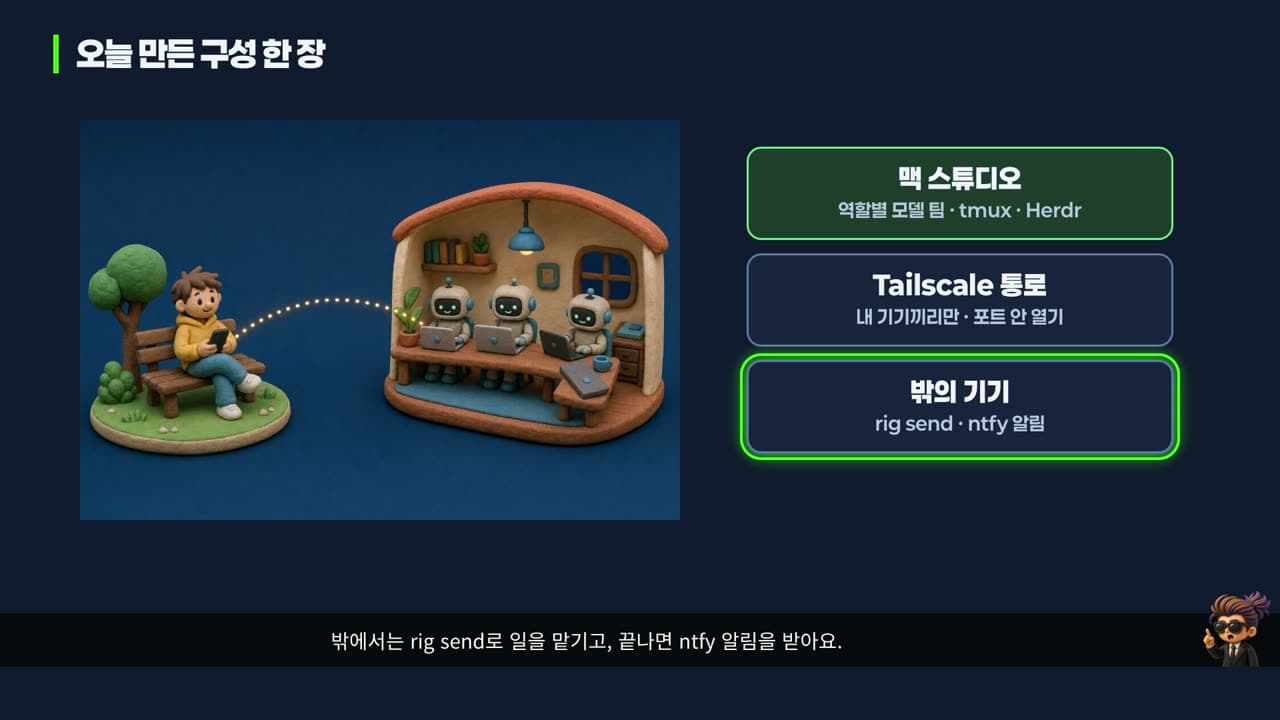
So this time we built a team with a different model in each seat. Opus leads, Haiku researches, Sonnet builds, and Codex, a model from another company, reviews. Then we left that team running on a Mac, walked away, handed it work from another device, and got a notification when it finished.
The video this post is based on is in Korean. This post covers the same material in English.
In this post:
- Four tools, three layers: Ghostty, Herdr, OpenRig
- Installing OpenRig and its daemon
- A team with a model per role, and the practice app
- Cross-review: what Codex actually checked
- Stopping and restarting the team: snapshots
- Reaching the team from outside with Tailscale
- Seeing the screen with RustDesk
- Handing off work while away
- Cost, limits, and troubleshooting
How to read the numbers. [Official docs] means material published by the maker. [Measured] means we ran it ourselves on a Mac Studio and a MacBook Air. We used OpenRig 0.7.4, Node.js 24, and RustDesk 1.5.0.
1. Four tools, three layers
The four tools:
- OpenRig turns several AI agents into one team and hands out work. Claude Code and Codex can sit on the same team. It is open source (Apache-2.0) [Official docs].
- Herdr is the window you watch the team in. Each agent gets its own pane, with a status light showing who is working.
- Tailscale is a private tunnel between your Mac and your other devices. It connects only your own devices without opening anything to the internet.
- RustDesk is a remote desktop that shows your whole Mac screen on another device. It does what TeamViewer or AnyDesk do, but it is free and open source.
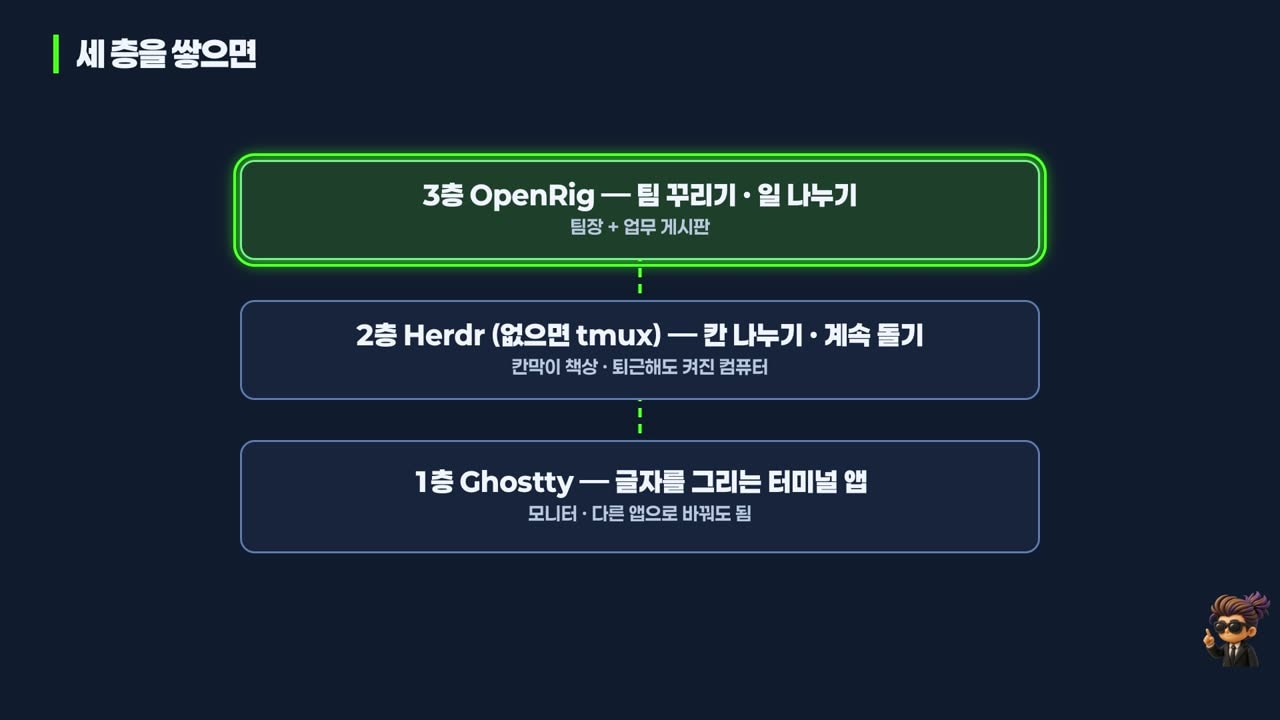
The most confusing part at first is how Ghostty, Herdr, and OpenRig relate. All three look like white text on a black screen. The answer: they work on different layers.
- Layer 1, Ghostty, is a terminal app. In office terms, it is the monitor. It draws what you type. Swap it for the stock macOS Terminal or iTerm2 and the layers above keep running.
- Layer 2, Herdr, is a terminal multiplexer, a tool that splits one window into many panes. In office terms, it is the cubicle desks. Sessions live in a background server, so agents keep working even after you close the terminal app. tmux is the older tool that does the same job.
- Layer 3, OpenRig, is the team lead and the task board. It assigns seats and roles and passes work along.
That picture clears up three common misunderstandings:
- "If I have Herdr, I don't need OpenRig." No. Herdr only splits panes. It doesn't know which pane owns which job.
- "OpenRig is a terminal." No. On its own it can't display text; it borrows the layers below.
- "Ghostty is required." No. Setup only offers it.
Remote access also splits into two kinds. Text remote (SSH in, type commands, read results) is light, and agents keep working on the Mac even if the connection drops. Screen remote (RustDesk) shows things text can't, like login windows, macOS permission prompts, and app screens, but it is heavy and opens up the whole Mac. The rule: text by default, screen only when you must.
2. Installing OpenRig and its daemon
You need Node.js 22 or 24, tmux, macOS or Linux, and at least one signed-in Claude Code or Codex. On Windows it works only through WSL2 (Linux running inside Windows). The docs recommend Node.js 22 on Apple silicon Macs [Official docs]. On our Mac, 24 worked fine too [Measured].
npm install -g @openrig/[email protected]   # global install, pinned version
rig --version
rig setup --dry-run                 # preview what will change
rig setup --providers claude,codex --no-ghostty --router-line no
rig daemon start
rig status
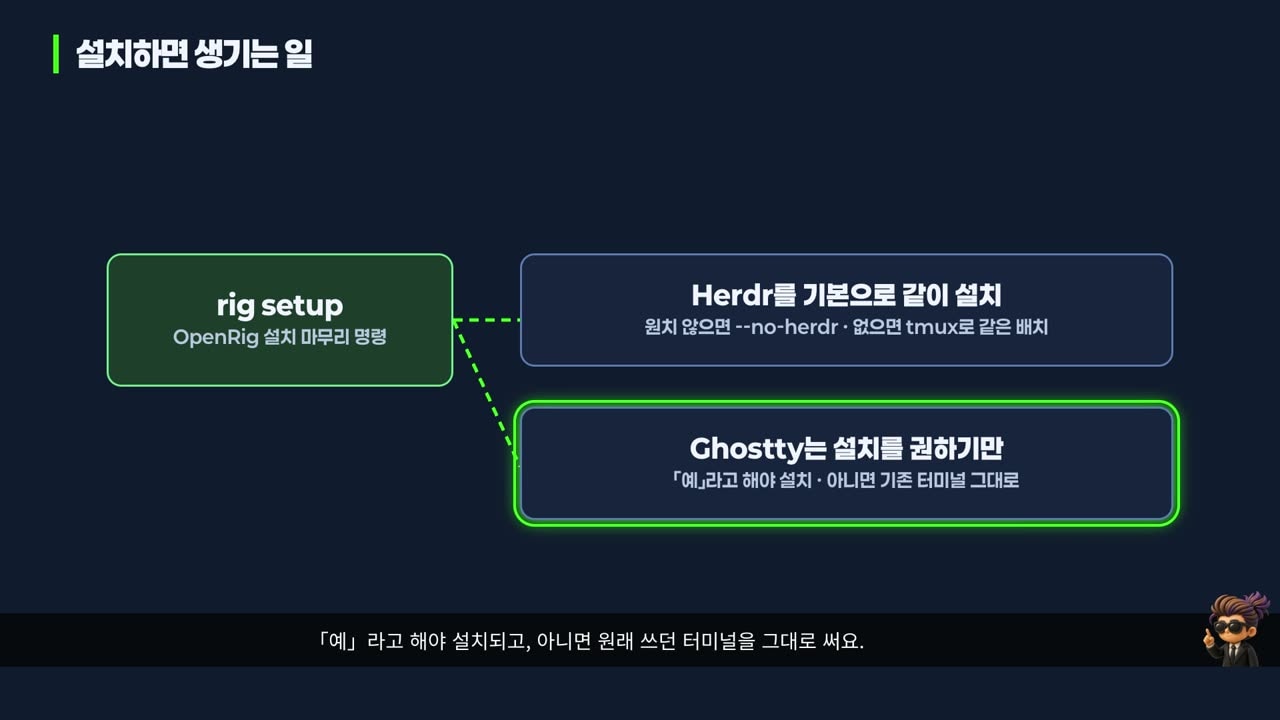
rig setupfinishes the install. It writes its own content into your Claude Code and Codex config files and into your project's CLAUDE.md or AGENTS.md. It edits your settings, so preview it with--dry-runfirst.rig setupinstalls Herdr by default. You can opt out with--no-herdr, and the same layout is then shown in tmux. On a Mac it only offers Ghostty [Official docs].- The daemon is a program that keeps running in the background with no window. Every
rigcommand is a request to it, so nothing works when it is down. Starting it also brings up kernel, the team OpenRig manages itself. We ask kernel's operator seat, in plain words, to build our team.
3. A team with a model per role, and the practice app
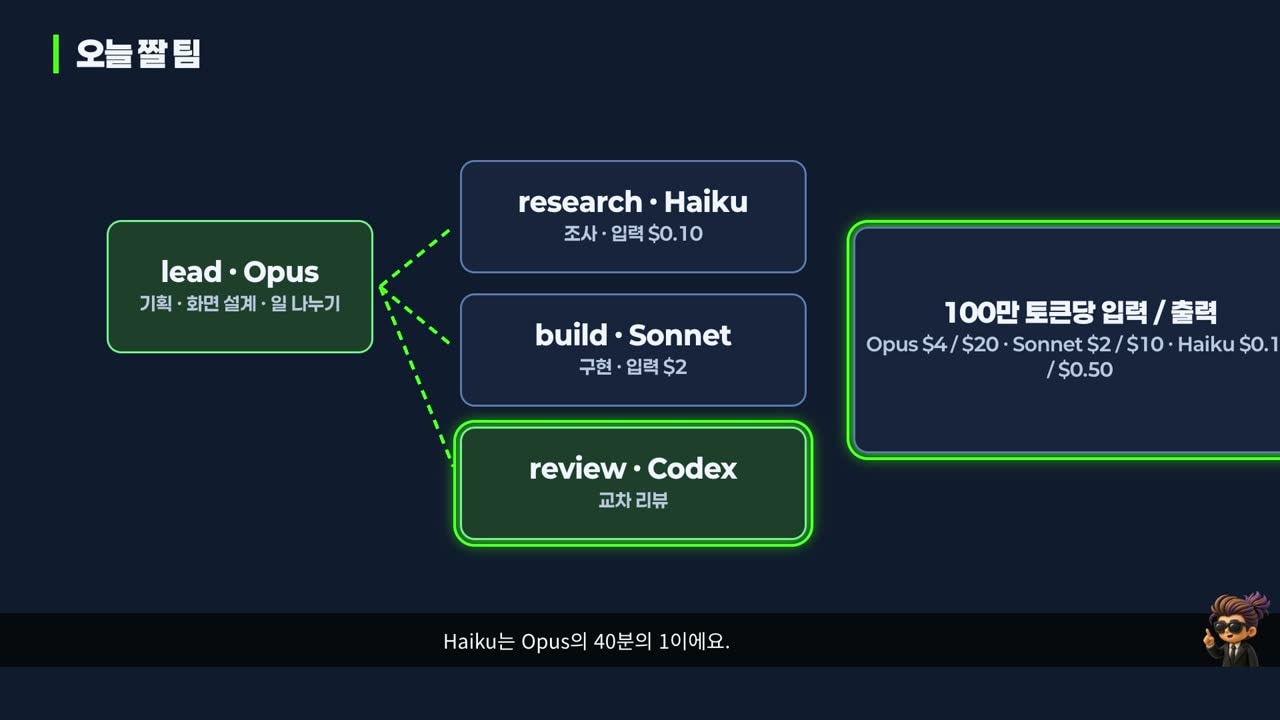
| Seat | Model | Job | Input price per 1M tokens |
|---|---|---|---|
| lead | Opus 5.5 | planning, screen design, splitting work | $4 |
| research | Haiku 5.5 | research | $0.10 |
| build | Sonnet 5.5 | implementation | $2 |
| review | Codex | cross-review | billed separately by OpenAI |
Prices come from Anthropic's official pricing page [Official docs]. Haiku's input price is one fortieth of Opus's. Anthropic also positions Haiku 5.5 as a sub-agent working alongside Opus or Sonnet, with complex agentic coding left to Sonnet or Opus [Official docs]. Codex reviews for the reason above: a model from a different company is less lenient than the model that wrote the code.
The practice app is Seoul Cultural Events Finder. It starts with 293 real cultural events from the Seoul Open Data Plaza, and at first it just lists event titles. When we ask the operator for a team, it creates a team file rig.yaml and per-seat role notes in rigs/culture/, and rig up brings up all four seats.
You talk to an agent with rig send, which types into that seat's terminal for you.
rig ps                                    # running teams
rig send operator-agent@kernel "hello"    # send to seat@team
rig capture lead@culture                  # read that seat's screen
One request to the lead, and the work split by seat: research (docs/research.md, Haiku), design (docs/design.md, Opus), build (Sonnet), and review (docs/review.md, Codex). The seat status showed the models that actually ran: opus 5.5, sonnet 5.5, haiku 5.5, and gpt 6.1 sol [Measured].
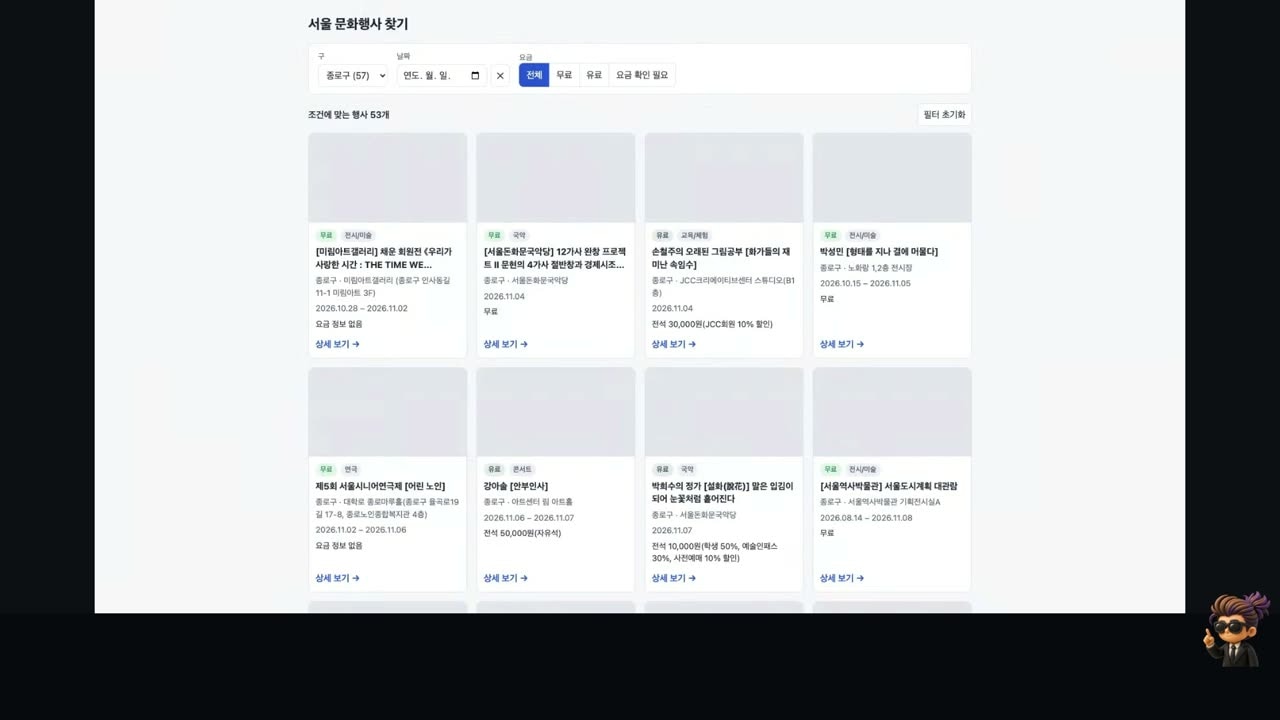
We applied the filters one at a time in the finished app [Measured]:
- District = Jongno: 53 events (57 for Jongno counting events that already ended)
- Date = November 5: 38
- Price = free: 27
- The 19 events where "free" was unclear went into a separate "check price" bucket
4. Cross-review: what Codex actually checked
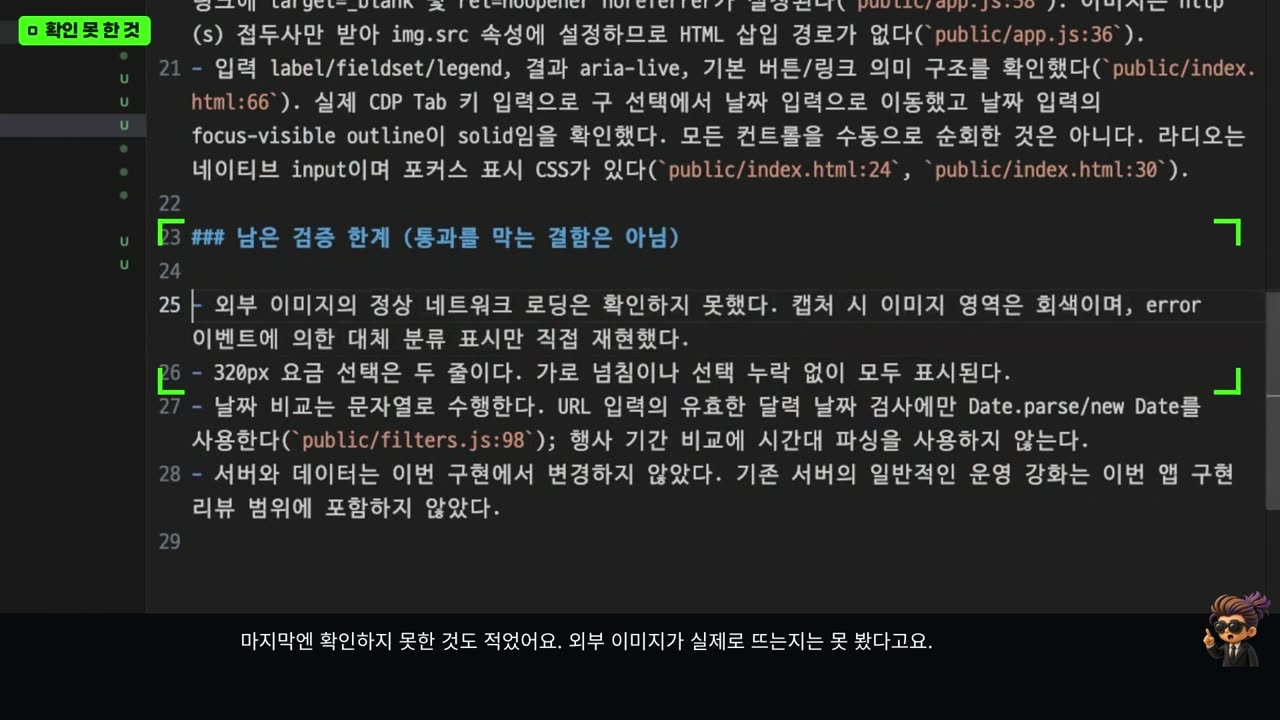
Anthropic's Sonnet built it; OpenAI's Codex reviewed it. What stands out is that Codex didn't take anyone's word for it [Measured]:
- It reran
npm test, which build had reported as passing: 13 tests. - It recounted the numbers on its own.
- It broke things on purpose. It simulated missing images and a failing server to check that the fallback boxes and the "try again" button appeared. Build had never captured that screen.
- It checked three screen widths, the narrowest a 320-pixel phone.
- It probed for XSS (an attack where code hidden in data runs on the page). An image tag inside an event title came out as plain text, and no tag was created.
The verdict was a pass with no defects to fix. Even so, review.md listed what Codex reran and also what it could not check (whether external images actually load). Leaving evidence and limits even when nothing is wrong is what a good review looks like.
The lead didn't report right away either. It ran the tests and checked the screen itself first. Then it handed two decisions to a human: whether to commit, and whether to turn on notifications. OpenRig calls this kind of work item a human-gate. Decisions that are hard to undo stay with people, not the team.
Cross-review did catch a real defect elsewhere in the course. When we applied the same setup to a real 3D floor-plan editor project, the Codex reviewer looked at the output image and found that the label of an L-shaped room sat in empty space outside the room and overlapped a wall. It passed only after the builder fixed it and the reviewer checked again [Measured].
5. Stopping and restarting the team: snapshots
rig down culture --snapshot     # save state, then stop
rig up culture --existing       # restart and resume conversations from the snapshot
rig snapshot list culture
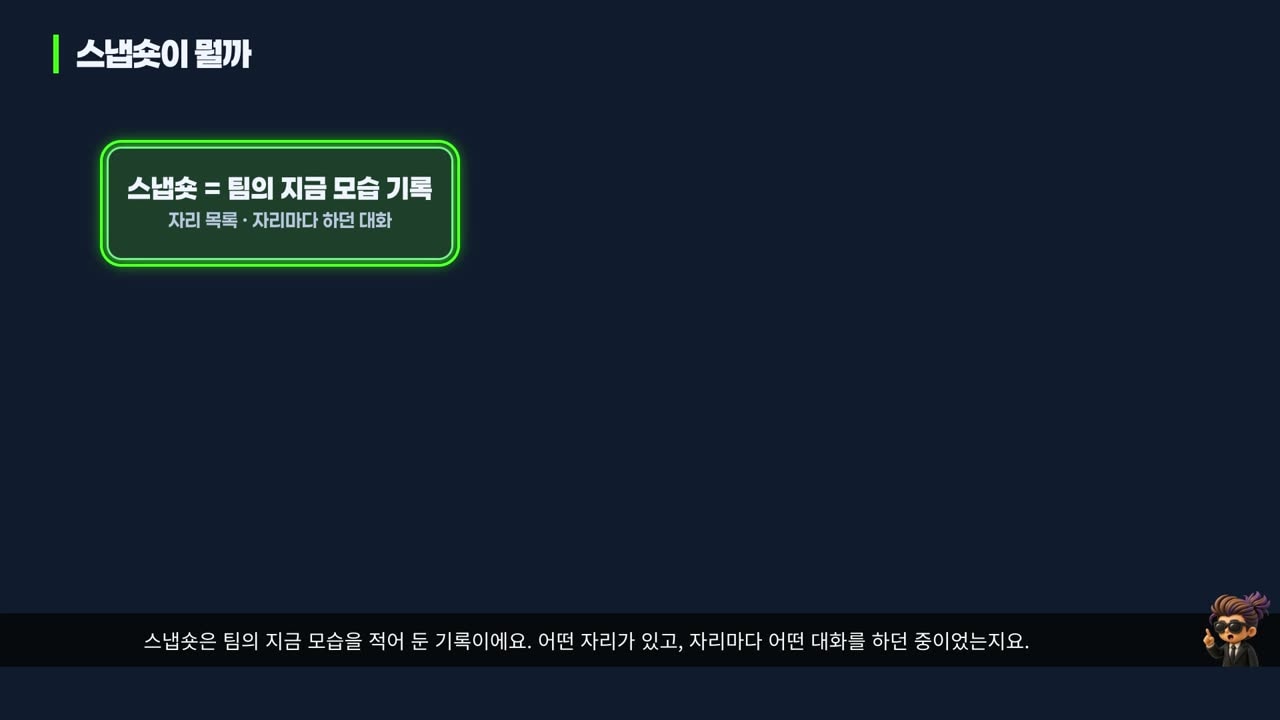
A snapshot records the team as it is: which seats exist and what conversation each seat was in. It is stored in the daemon database under .openrig in your home folder.
rig down culture --snapshotstopped four tmux sessions and saved a snapshot.rig up culture --existingreportedfully restored, with all four seatsresumedmid-conversation [Measured].rig snapshot listshowed one taken just before stopping (auto pre down), one just before restoring (pre restore), and ones the daemon takes automatically every 5 minutes (auto periodic). Even if you forget the flag, a recent record exists.
6. Reaching the team from outside with Tailscale
Tailscale puts devices signed in to the same account on one private network, a tailnet. Each device gets an address starting with 100 that stays the same wherever it goes. Devices connect directly when they can and through Tailscale relay servers when they can't. Either way, traffic is encrypted with WireGuard [Official docs].
tailscale status        # devices in your tailnet
tailscale ip -4         # this device's 100.x address
tailscale ping <device name>
ssh -t <device name>
Finding devices by name instead of address is called MagicDNS. We SSHed from the Mac Studio into the MacBook Air without opening or touching a single router port [Measured].
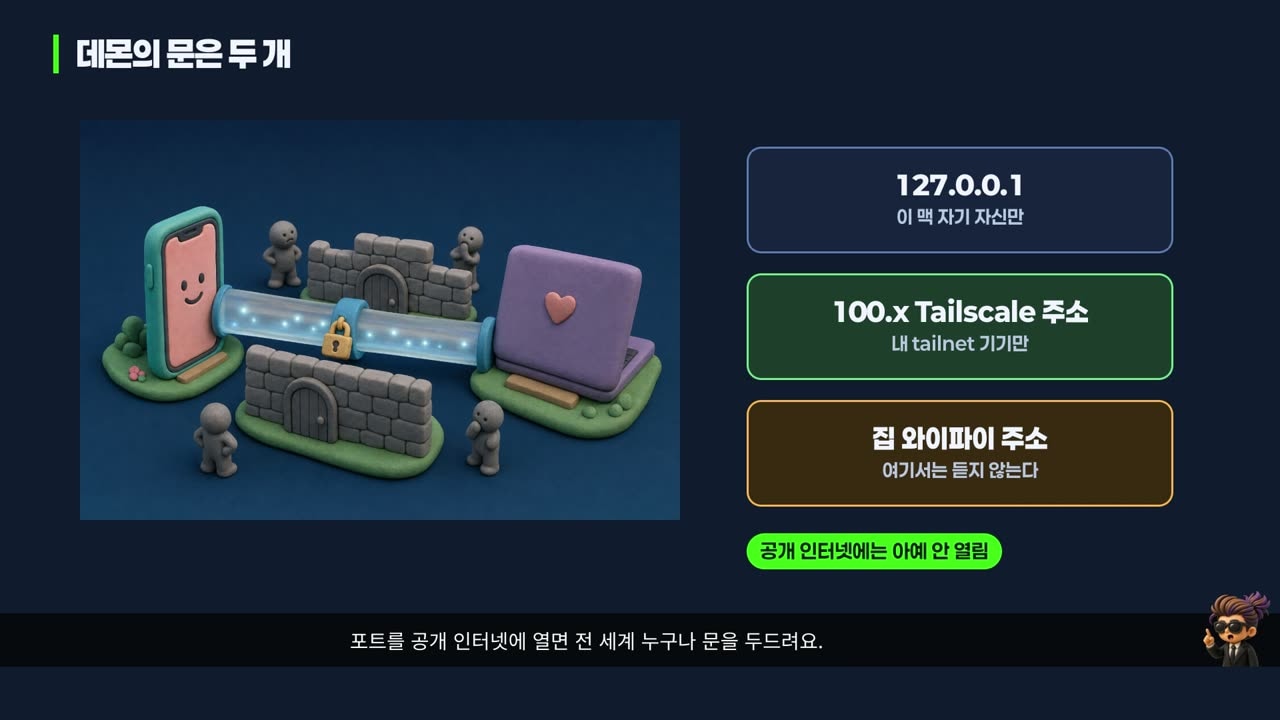
The OpenRig daemon opens only two doors: 127.0.0.1, for the Mac itself, and its Tailscale address. There is no door on the home Wi-Fi address, so other devices in the same house can't get in. Agents run commands on your computer, so never expose the port to the public internet. If several people share a tailnet, you can block just the OpenRig port with access control rules (ACLs) in the Tailscale admin console [Official docs].
7. Seeing the screen with RustDesk
Install RustDesk like any other Mac app, from the dmg on its GitHub releases page. The Mac that shares its screen needs two permissions:
- Screen & System Audio Recording sends your screen. Without it, you connect but see only black.
- Accessibility accepts remote mouse and keyboard input. Without it, you see the screen but clicks and typing do nothing.
We hit one trap ourselves. RustDesk was already running before we granted the permission, so the connection succeeded but stalled at "waiting for image." macOS applies new permissions only after the app restarts. After we quit and reopened RustDesk, the screen came through [Measured].
There are two ways to connect:
- By ID: RustDesk's public server finds the two devices, and falls back to a relay when it can't connect them directly.
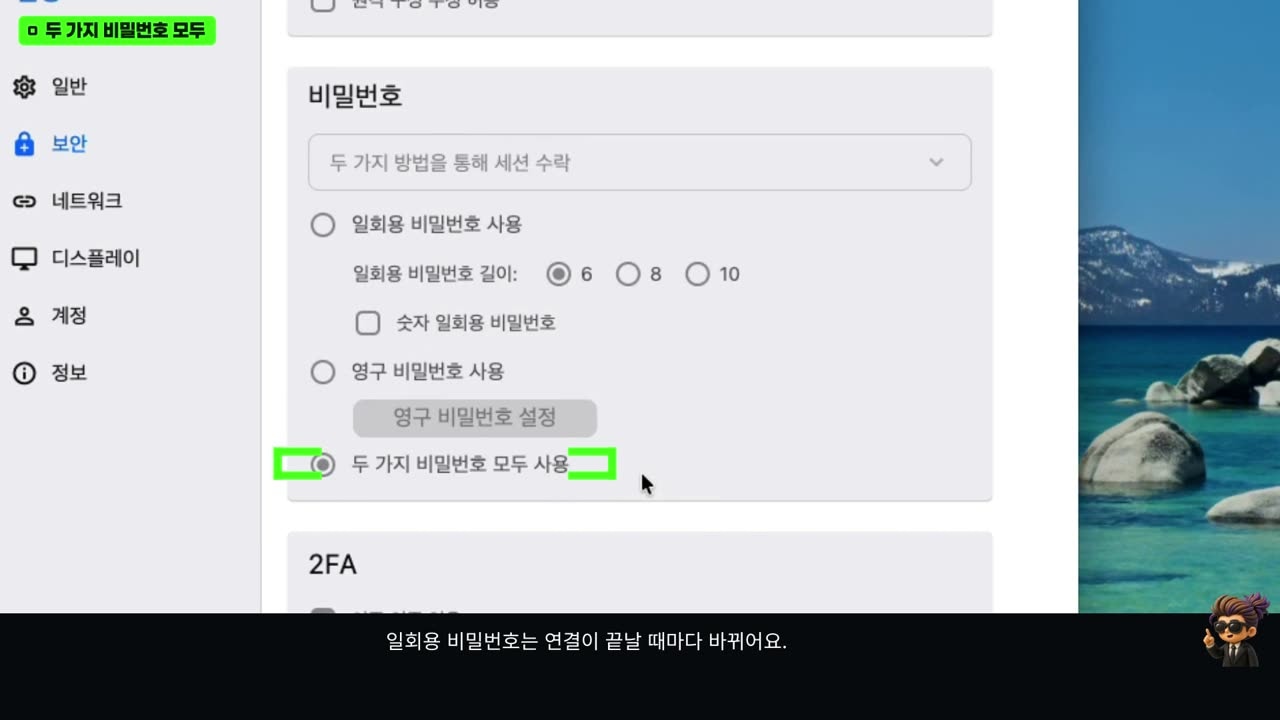
- Directly by Tailscale address: turn on "Enable direct IP access" in the sharing side's security settings, then type its 100.x address in the remote ID field to connect without any outside server. This uses port 21118 [Official docs].
A caution: with direct IP access on, anyone on the same Wi-Fi or tailnet can knock on that port. Putting only the viewing device's Tailscale address in the IP whitelist is safer. And the direct-address connection showed a red shield on its tab, which means RustDesk had not encrypted that connection itself [Measured]. So use direct-address connections only inside an encrypted tunnel like Tailscale. For times when nobody is home to click "accept," set a long permanent password you don't use anywhere else.
8. Handing off work while away
This is the scene the whole course builds toward: leave the team on the Mac Studio, hand it work from another device, and get notified when it is done. The video demonstrates it from a MacBook Air; the steps are the same with an SSH app and the ntfy app on a phone.
Two things to prepare on the Mac before you leave:
- Notifications. OpenRig can send notifications through ntfy, a free notification service. The daemon reads notification settings at startup, so restart it after configuring. From then on, any human-gate item triggers a notification. Anyone who knows an ntfy topic name can read it, so add random characters to make it unguessable.
- The builder's permission mode. Claude Code often asks before running commands. In the builder seat, press shift+tab to switch to auto mode, where it runs commands it judges safe and stops only on risky-looking ones.
The outside device gets only rig at the same version (0.7.4). No daemon, no agents; it is just a remote control.
rig host add --id studio --transport http --url http://<mac's tailnet name>:7533
rig ps --host studio
rig send dev-build@starter@studio "Add a floor-plan PNG button, then tell me with a human-gate item when done"
Port 7533 is the daemon door we opened only to Tailscale. The only thing that changes remotely is adding --host studio or @studio [Measured]. After that, the builder wrote the code alone, the reviewer checked the output image (this is where the L-shaped room label defect from section 4 was caught), the project's full checks ran, and then the notification arrived.
One caveat: we had not switched the Codex reviewer seat to auto mode, so it stopped once on a permission prompt and had to be approved on the Mac. Before you walk away, check the permission mode of every seat.
9. Cost, limits, and troubleshooting
Cost. Had all four seats run Opus, research and build would also have cost $4 per million input tokens. This team used Opus only for the judgment-heavy lead seat, gave building to Sonnet at half of Opus's price ($2), and research to Haiku ($0.10) [Official docs]. Codex is billed separately through an OpenAI subscription or usage, so you need accounts with both companies to run this exact team.
Limits.- Haiku 5.5 costs more once a single prompt goes over 100,000 tokens: input jumps from $0.10 to $0.50, five times as much [Official docs]. Feed it whole large files and the savings disappear.
- Permission bypass (run without asking) lets agents execute anything. Use it only in an isolated folder and account, as in the practice setup.
- Agents make mistakes. This time, build used a command that doesn't exist on macOS and had to fix it. That is why the reviewer reran the tests and counts, and the lead checked again before reporting.
- OpenRig officially supports macOS and Linux. Native Windows isn't supported, only WSL2 [Official docs].
- A remote desktop opens up the whole Mac. Be careful with permissions and passwords.
Troubleshooting order. If the Mac doesn't answer from outside, this order finds most problems:
- Is the Mac asleep? Check
pmset -g custom. Our MacBook Air was set tosleep 1, sleeping after one idle minute [Measured]. A desktop, or a plugged-in Mac with sleep turned off, makes a better agent machine. To keep it awake temporarily, usecaffeinate -dims. - Is the daemon down? If
rig pssaysDaemon not running,rig startbrings back the daemon, kernel, and the teams that were running. - Can the devices reach each other? If
tailscale ping -c 2 --timeout 3s <device name>times out, turn Tailscale on for the device that is off. - Still stuck? Run
rig doctor. Each failed check comes with a Why and a Fix.
Four things to remember. Text remote by default, screen only when needed. Never open the Mac to the public internet; stay inside Tailscale. Before you leave, set up notifications, permission modes, and sleep settings. And decisions like commits belong to people.
Watch the video
We turned this into a free two-hour course (in Korean) that walks through everything on real screens, from install to remote access. The practice app code is tagged per lesson.
- Watch on YouTube: Running an AI agent team with OpenRig, Herdr, and RustDesk
- Practice repo: dante01yoon/openrig-practice
Sources
- mvschwarz/openrig — README (v0.7.4): requirements, what
rig setupchanges, Herdr installed by default · openrig.dev - Herdr, How to work · Session state
- Anthropic, Pricing — Opus, Sonnet, and Haiku 5.5 prices; Haiku pricing above 100K tokens · Claude Haiku 5.5 · Claude Code subagents
- Tailscale, What is Tailscale? · MagicDNS · ACLs
- RustDesk, rustdesk/rustdesk · Advanced settings (direct-access-port 21118)
- ntfy docs
- Seoul Open Data Plaza, Seoul cultural events